CORE HL7 Postmaster

Created with the CORE HL7 API Libraries for .Net 8
The answer to this question can be very simple or it can be complex depending on your needs. Simply put a CORE HL7 Postmaster will deliver HL7 messages intelligently to one or more .
So let's boil it down to a few simple statements about what makes up a CORE HL7 Postmaster.
1.Every Postmaster will have a primary file extension and Central Distribution Folder. A folder on the file system through which all HL7 messages flow.
2.A Postmaster MUST have at least 1 enabled HL7 Data Source OR 1 enabled HL7 Destination (which is NOT a Rubbish Bin).
3.The Postmaster itself will NEVER delete a HL7 message that has not been successfully processed by a Closed End Point, with the exception of Archives (if applicable), however EVERY message in EVERY data file encountered by the Postmaster must have an and be at some point, by some process.
1. The
Every Postmaster will have a primary file extension and Central Distribution Folder. A folder on the file system through which all HL7 messages flow.
Distribution Folder
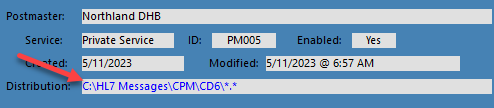
In the screenshot above you can see that this Postmaster profile has the Distribution folder set to C:\HL7 Messages\CPM\CD6\. The primary file extension for this Postmaster is * which you can tell by the *.* at the end of the folder.
2. Types of Postmasters
A Postmaster MUST have at least 1 enabled HL7 Data Source OR 1 enabled HL7 Destination (which is NOT a Rubbish Bin). There are 3 types of Postmasters.
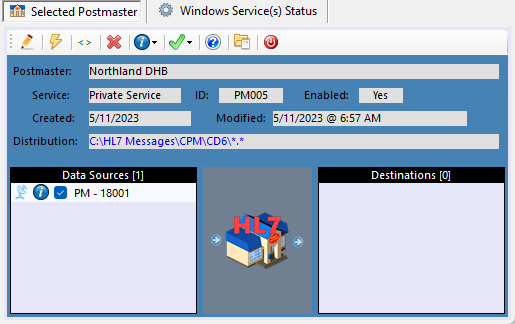
These are Postmasters which have ONLY HL7 Data Source(s) and no destinations. HL7 message data files are pulled in to the Central Distribution Folder and left there with no further processing. It would then be up to YOU to consume those HL7 message data files. See the example below.
 HL7 Listener Data Source
In the screenshot above the Northland DHB Postmaster has a HL7 TCP/IP Listener Data Source enabled. It will listen on Port #18001 for HL7 messages and as it receives them they will be placed into C:\HL7 Messages\CPM\CD6\ with a *.hl7 file extension. At that point some OTHER process must CONSUME those data files. You can have, theoretically, an unlimited number of HL7 data sources simultaneously depositing HL7 message data files into the Distribution Folder. There are 5 different types of data sources, see HL7 Data Sources for more information.
|
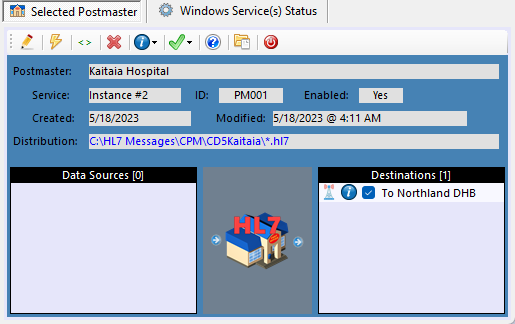
These are Postmasters which have ONLY HL7 Destinations(s) and no data sources. HL7 message data files are placed into the Central Distribution Folder by you (or some other process) and are then distributed to one or more HL7 Destinations. What happens at each HL7 Destination depends on the type of destination. See the example below.
 HL7 TCP/IP Sender Destination
In the screenshot above the Kaitaia Hospital has a HL7 TCP/IP Sender Destination enabled. SOME process will place HL7 data files into C:\HL7 Messages\CPM\CD6\ with a *.hl7 file extension. These data files can contain 1 message per file OR many messages per file. At runtime the Postmaster will extract all HL7 messages from each file in Central Distribution into individual discrete message data files for delivery to each Destination. This particular type of destination CONSUMES each message as it is delivered so the only thing for the user (YOU) to do is make sure that messages are being delivered. There are 4 different types of destinations, see HL7 Destinations for more information.
|
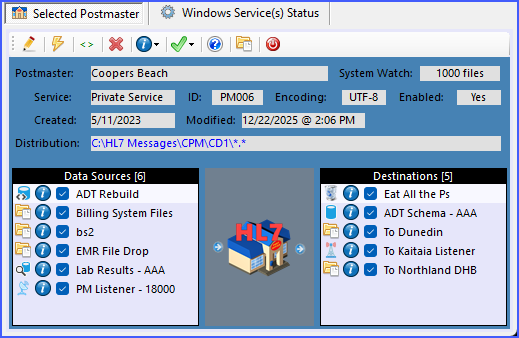
We say that a Postmaster is Complex when it has both HL7 Data Sources and HL7 Destinations. See the example below.
 A Complex Postmaster
In the screenshot above the Coopers Beach Postmaster has 5 different HL7 Data Sources and 5 Different HL7 Destinations. This particular Postmaster contains an example of every different type of Data Source and every different type of Destination.
|
3. Things to watch out for.
The Postmaster itself will NEVER delete a HL7 message that hasn't reached a proper , with the exception of Archives (if applicable), however EVERY data file encountered by the Postmaster must have an and must be at some point, by some process.
Remember one of our primary tenets for the CORE HL7 Postmaster. We will NEVER delete a HL7 message, and every message MUST be consumed at some point. Consider the example below.
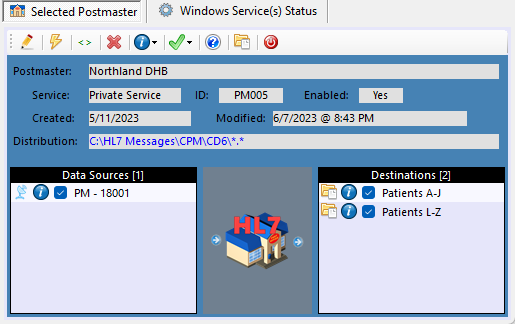 WARNING - Bad Practice
In the screenshot above the Northland DHB Postmaster has a HL7 TCP/IP Listener Data Source enabled. It will listen on Port #18001 for HL7 messages and as it receives them they will be placed into C:\HL7 Messages\CPM\CD6\ with a *.hl7 file extension. Since there are enabled HL7 Destinations at this point the Postmaster software takes over and for each HL7 message it will evaluate whether that message can be delivered to a HL7 Destination (using the Matching Instructions) and if it does it will dispatch that HL7 message into a file for the appropriate destination(s).
Your Postmaster can deliver the SAME HL7 message to multiple destinations with the exception of the Rubbish Bin destination which has special properties (see Rubbish Bins). For the example above we have 2 Folder Destinations enabled and we named them as you see to make it easy to explain.
The Destination Patients A-J has Matching Instructions which say to only accept messages where the Patient Last Name (PID 5.1) Begins With the letters A through J.
The Destination Patients L-Z has Matching Instructions which say to only accept messages where the Patient Last Name (PID 5.1) Begins With the letters L through Z.
Consider this scenario. What's wrong with it? The answer is: What about Patients whose last name starts with K.
What does the Postmaster do in this scenario when it encounters a HL7 message where the Patient Last Name starts with K? We MUST do something with these messages because we will NEVER delete a HL7 message AND we always assume that the user who created the Postmaster knew what they were doing.
The answer is that since there is no HL7 Destination which will accept these K messages they are UNDELIVERABLE. These messages will be placed into the UNDELIVERABLE folder which is a SUB-FOLDER of Central Distribution. The name of the Undeliverable folder will be <CentralDistribution>+<PostmasterID>+.AllUndeliverable\. For the example shown in the screenshot above the UNDELIVERABLE folder would be C:\HL7 Messages\CPM\CD6\PM005.AllUndeliverable\. Messages sent to the UNDELIVERABLE folder will always have a *.hl7 file extension.
If this customer truly wanted to exclude messages where the Patient Last Name begins with K, the proper solution would be to create a Rubbish Bin destination which would "eat" all of the K messages.
How do you prevent this?
•Design your Postmasters carefully. Whiteboard everything out.
•Monitor your UNDELIVERABLE folder(s). If you've done everything right this folder should ALWAYS be empty. You can use the System Watch runtime to give you a display.
|
Plan carefully and avoid conflicts and infinite loops.
In the Validation Process we do everything in our power to keep users from stepping in it, but it is still possible especially if you have many different CORE HL7 Postmasters. We strive to give the user as many different options as possible, because the CORE HL7 Postmaster is there to serve your needs. So, if you are creating many different Postmasters OR you are creating very complex Postmasters use a whiteboard and design your system carefully and keep these things in mind.
You can create as many different Postmasters as you like.
System Watch keeps an eye on HL7 message queues. Since we are dealing with HL7, IE medical data, we take it very seriously. System Watch will monitor all of your and STOP your Postmaster if message queues build up.
One Postmaster can feed one or more other Postmasters. This is easy, in Postmaster A, just create a Folder Destination which delivers HL7 messages to the Central Distribution Folder of Postmaster B. Now, keeping that in mind, you can see the potential for creating an infinite loop. Postmaster A feeds Postmaster B which in turn feeds Postmaster C which feeds Postmaster A and chaos ensues.
Give special consideration to FOLDER Destinations. The Folder Destination can be both a great strength and a great weakness depending on how you use them. Problems with a folder destination can be compounded exponentially if you are using or plan to use Network Shared folders. To understand better let's look at how the Postmaster works.
All Data Sources are processed simultaneously in their own separate thread. If you have a SQL Data Source and the SQL Server is offline, that's a problem, but it's not critical, everything keeps working. If you have a Folder Data Source and the folder is a Network Share and that server is offline, again, it's a problem but not critical. The Folder Source will just continue trying to access the folder until it comes back online.
For your HL7 Destinations there is a different dynamic going on. For SQL Destinations or TCP/IP Sender Destinations, or Rubbish Bins which do NOT use a data folder, there is no issue because HL7 messages are actually queued in Sub-Folders of the Central Distribution Folder. As the Postmaster runs these folders WILL be there and WILL be available or everything would stop.
For Folder Destinations (and Rubbish Bins which DO use a data folder) all of them MUST be available at runtime. If you have 10, 20, 30 different folder destinations and even ONE of those folders is not valid (or offline) then that Postmaster MUST stop processing.
WHY? Because this is HL7 and it's serious business. If YOU create a Folder Destination then we assume that YOU want HL7 messages delivered there and thus it falls to YOU to make sure that those folders are valid.
IMPORTANT: Further considerations about using Folder Destinations which are Network Shared folders. Remember that we (the Postmaster software) are using the same Windows OS that YOU are when you log into the computer / server. In Windows File Explorer try accessing a network share which is offline. How long does it take YOU to do it? And why would you think that somehow WE can do it faster? Of course you can use Network Shares, we are not in any way discouraging you from doing it, just be wary. It can drastically increase the time it takes for your Postmaster to start running or stop running.
|
See Next: Creating Postmasters, HL7 Data Sources, HL7 Destinations, Running Your Postmasters, System Watch.

