CORE HL7 Postmaster

Created with the CORE HL7 API Libraries for .Net 8
It’s important to remember that with the CORE HL7 Postmaster we are dealing with HL7 messages. This is medical data, and we always assume the position that every single message contains vitally important data that must be delivered promptly and properly to its ultimate destination. In order to do this, it is assumed that every single HL7 message that enters the Postmaster MUST have a valid and MUST be by some process, either by a process of ours, or a process of yours.
With System Watch we are instructing your CORE HL7 Postmaster to keep an eye on your data folders and queue folders to make sure that they are not overfilling with HL7 messages. You get to set the System Watch Threshold in the Central Distribution section of the Edit Postmaster Window.
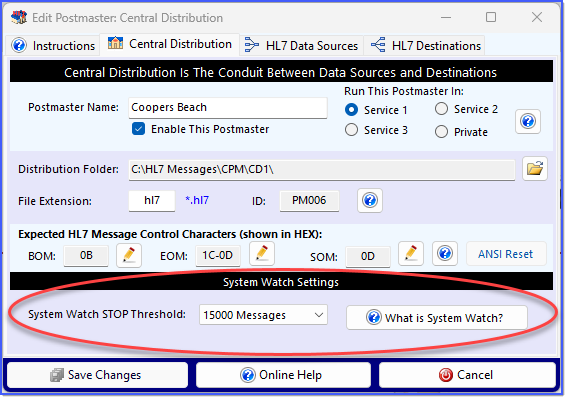
System Watch Settings
Version 3 of the CORE HL7 Postmaster allows you to set your System Watch STOP Threshold from a minimum of 1000 messages up to a maximum value of 50000 Messages. Feel free to if you have any questions or concerns about this. We do listen to our customers and if you think that there's a valid reason to increase or decrease these allowed values please let us know.
What does this mean? As an example, you can create a HL7 Destination of Types TCP/IP (IE send HL7 messages to a TCP/IP listener) and CORE MS SQL Schema Database. These 2 Destination Types are and the HL7 messages which are dispatched to them for processing. The TCP/IP Destination sends an HL7 message out, and then deletes the file containing the message (IE it). A CORE MS SQL destination imports a message into the database and then deletes the containing file. By contrast, you can create a HL7 Destination of type FOLDER which is an . With these Destination Types the Postmaster simply writes the HL7 message into a file in the Windows Folder and leaves it there, relying on some other process of YOURS to consume that data file.
With System Watch you set the STOP threshold values which limits the total number of HL7 messages allowed to “queue” up in any of your destinations before it will STOP processing until the total number of messages queued goes below the RESTART threshold (which will be ½ of the STOP threshold).
EXAMPLE: Let us say that in your CORE HL7 Postmaster you have created 10 different HL7 Destinations. 1 of them is a TCP/IP Destinations, 2 are CORE MS SQL Schema Destinations and the remaining 7 of them are FOLDER destinations. Your FOLDER destinations feed 7 other HL7 interfaces in your system (to medical devices for instance).
You set the System Watch STOP Threshold to 1000. Now let us say that for your TCP/IP destination, the HL7 Listener it needs to send those messages to is not online and listening, so HL7 messages begin to queue up waiting to be sent out. Meanwhile, 1000 HL7 messages are flowing into CENTRAL DISTRIBUTION and being dispatched to all 10 of your Destinations. What happens next?
As soon as the number of messages waiting in your TCP/IP destination reaches the STOP threshold (1000), your Postmaster will STOP dispatching messages to ANY destination until the number of messages waiting falls below the RESTART threshold (500). This can happen one of two ways, either:
1.The HL7 Listener comes online, allowing your TCP/IP Sender to deliver the waiting messages. OR…
2.You manually intervene and resolve the problem, either by contacting the other side and identifying the problem OR by disabling the offending destination.
|
Some things to know about System Watch.
When a Postmaster is running, whether Running Locally, Running in a Primary Service, or Running in a Private Service, System Watch is running in the background.
System Watch runs one cycle every 60 seconds. This means that it's NOT exact. Your Postmaster runs very fast. IF your STOP threshold is 1000 messages, and System Watch sees 999 messages at the end of a cycle, there could be several hundreds or even several thousands of messages that are dispatched and queue up in the following 60 seconds.
This also means that IF System Watch is Triggered and your Postmaster Stops dispatching messages, it will take AT LEAST 60 seconds for your Postmaster to restart.
When System Watch is Triggered your all of your Destinations which are (TCP/IP Sender Destinations and CORE MS SQL Destinations) DO NOT stop processing if they have messages queued up.

