CORE HL7 Postmaster

Created with the CORE HL7 API Libraries for .Net 8
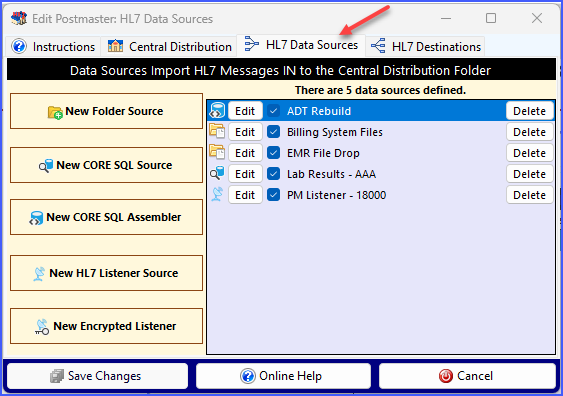
HL7 Data Sources
HL7 Data Sources deliver HL7 Messages IN to your Postmaster's Central Distribution Folder. IF your Postmaster also includes enabled HL7 Destinations your Postmaster will evaluate all messages and deliver them to the appropriate destination. IF your Postmaster has no enabled HL7 Destinations, message files are left in your Distribution Folder and it is the Open End Point.
To edit any existing data source click the Edit button in the list of data sources. To delete an existing data source click the Delete button.
You can create as many different data sources for a Postmaster as you like. At runtime your data sources will all process simultaneously!
With the CORE HL7 Postmaster you can create 4 different types of data sources. They are:
•Folder Data Source: Moves HL7 data files from a Windows folder into your Distribution Folder.
•CORE SQL Source: Retrieves HL7 messages from a CORE MS SQL Schema database and deposits them as discrete single-message files in the Distribution Folder.
•CORE SQL Message Assembler: Actually constructs (or reconstructs) HL7 messages in a CORE MS SQL Schema database and optionally deposits them in your Distribution Folder.
•HL7 Listener Source: Listen for HL7 messages with our CORE HL7 TCP/IP MLLP Listener. As HL7 messages are received they will be deposited into your Distribution Folder. NOTE: The number of HL7 Listener Sources you may create is determined by what type of Postmaster License you have (See How Licenses Work)
•Encrypted IPSec Tunnel HL7 Listener: Listen for HL7 messages using our CORE HL7 IPSec Tunnel HL7 Listener. Encryption is provided by an X509 Encryption certificate using TLS 1.2! You can create any number of these objects with a valid license
See Next: HL7 Destinations
