Every CORE HL7 Script Hosting Application will have and maintain their own Script Library. It is through this interface that you can create / view / edit your CORE HL7 C# scripts. In the CORE HL7 Viewer you access your Script Library through the Tools menu in the Main Window.
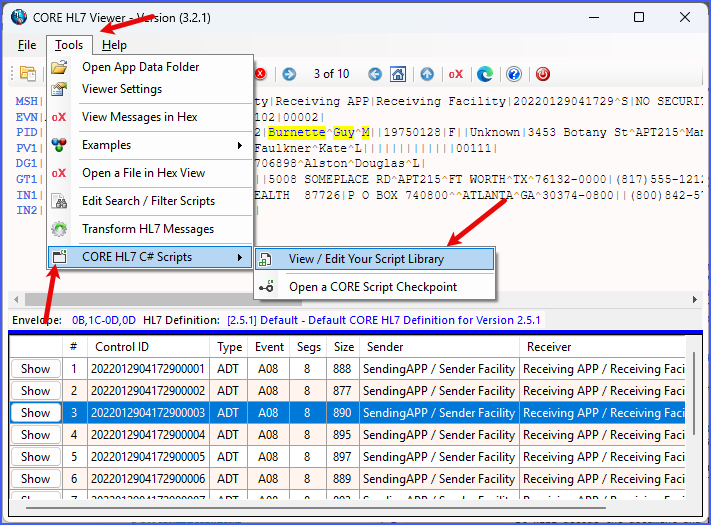
View / Edit Your Script Library
This opens up the CORE HL7 Script Library for the CORE HL7 Viewer.

View / Edit Your Script Library
The first time you do this, of course, your library will be empty. It will remain so until you create at least 1 CORE HL7 Script.

Create a new script
To create a NEW script click the  button on the toolbar OR select Create a New Script from the File menu.

Create a new script
The Script Library will automatically create the new "Default" script with the name you enter. See Types of Scripts for a breakdown. While in the New Script window you can click the  buttons to peek at the C# Code for each script type.
Now you are ready to edit your script.

Edit From the Script Library
To edit an existing script just select the script in the library items list and then click the Edit button on the right hand toolbar to open the Compiler window.

The CORE HL7 Script Compiler Window
 IMPORTANT: you CAN edit your script directly in the Compiler window you will probably only want to use it for very simple changes or tweaks because, while attractive, it's not a very good code editor.
WHY NOT? Because other companies (like Microsoft) have spent millions of dollars developing and perfecting C# code editors which are available for FREE (see the video here) and we concentrated our resources on providing the Compiling and Running features.
In the Compiler Window you also set other Script Properties like Files and Folders and SQL Connectors (for either MS SQL or MySQL) which your script may access.

Files and Folders
Click the Additional Script Properties tab to access Files and Folders and the Script Description. In this tab you can set:
•The Output Folder
•The Logs Folder
•The Error Folder
•The Configuration File
•The Script Description / Notes
NOTE: With the exception of the Script Description, the Output Folder, Logs Folder, Error Folder and Configuration File SCRIPT properties are OVERRIDDEN in your Script Engine Profile when your are using the CORE HL7 Script Engine.
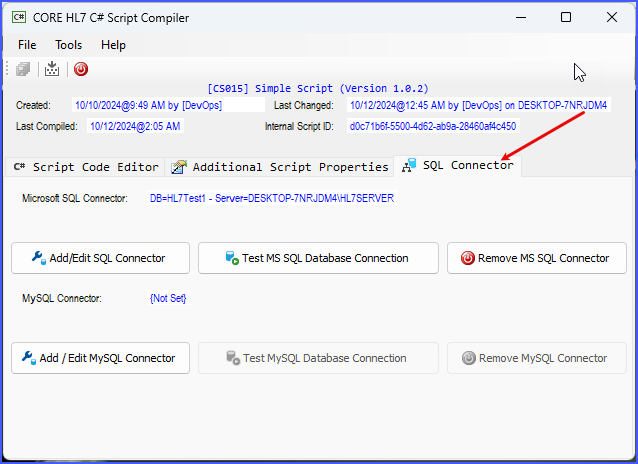
SQL Connector(s)
Click the SQL Connector tab to access your script's database connectors (if needed). In this tab you can create a connector for Microsoft SQL Server and / or MySQL.
NOTE: The Microsoft SQL and MySQL Connectors that are configured in your script will be OVERRIDDEN in your Script Engine Profile.

Once you have completed your script you are ready to either Running Your Script, or Export It to a Script CheckPoint.
