In the CORE HL7 C# Script subsystems there are 3 basic types of scripts that you can create. How you create them is really up to you. If you are extremely proficient you can start with a blank document in Notepad and just write the C# code for your script. As long as it follows the conventions laid out in the CORE HL7 C# Script Reference it will compile and work. When you create a new script in any CORE HL7 Script library you will be presented with a choice of "default" scripts for you to start with. You choose which "default" script will most closely match what you want to do and it will give you a great starting point for you. The 3 basic types of scripts are outlined below:
A Type 1 script is a script which will have HL7 messages passed into it, one at a time by the Script Hosting application. Typically these types of scripts will perform actions on that single message and then discard it. This is the most common type of script it should be designed to QUICKLY perform whatever actions you need and then EXIT (return). Below is an example of the "Default" Type 1 script.

/* This is an example of a TYPE 1 Script which requires * that the hosting application pass in an HL7 message * which it will act on. This type of script will only * process ONE (1) HL7 message and then exit. * * BELOW are the using statements which are required */ using System; using COREHL7; using COREHL7ScriptHost; /* ABOVE are the using statements which are required */ using System.Collections.Generic; using System.Linq; using System.IO; using System.Xml; using System.Data; using System.Data.SqlClient; //.Net 8 Scripts will use Microsoft.Data.SqlClient using System.Text; /* ABOVE are the optional using statements you can include */
/* * Here we declare our globals object which we will set in our Execute() method. * By placing it here we can access it all throughout our script */ public static COREHL7Script globals;
/* * Here we declare our MyMessage object which will contain our single HL7 message. * We will set this object in our Execute() method and verify that the object is valid. */ public static CHS_Message MyMessage;
/* You can create your own classes, variables, or methods here above this line */ public class Script { //This Script class is your MAIN class. It MUST be present to run
public void Execute(COREHL7Script parent) { //This Execute method in your Script class is your MAIN method. It MUST be present to run! globals = parent; try { /* Your Executable code goes in here below this line */ globals.Trace("Script is working......"); //InitialHL7Message will be a string containing the single HL7 message we be processing if (string.IsNullOrEmpty(globals.InitialHL7Message)) { //This should NEVER happen unless running the CORE HL7 Viewer and running the script with no messages loaded globals.SetException("No action required.No initial message", "Script()", 321342); /* When we call globals.SetException() it will automatically generate both a Trace() event * for Runtime Windows and a LogIt() event to log the error IF the Logs folder has been set. */ globals.Completed = true; /* * We set globals.Completed to true to tell the hosting application that we have processed the * message to the fullest extent that we can and then return. */ return; } //At this point we have the initial string value and can continue if (!COREScriptUtilities.IsFolder(globals.OutputFolder)) { //This directory checking is optional. When you call the CommitMessage() method //A CORE HL7 Script Engine will write the message out to the output folder. globals.SetException("Output folder is invalid or not set.", "Script()", 90882); /* * Here we set globals.Completed to false to tell the hosting application that we were unable to process the * message because of an error. A CORE HL7 Script Engine will then NOT consume the file containing the * message, but will stop processing, wait for 30 seconds, and then try again until the folder IS valid. */ globals.Completed = false; return; } /* * Instantiate our MyMessage object. CreateInitialMessage() will use the InitialHL7Message string value * to build a CHS_Message object. */ MyMessage = globals.CreateInitialMessage(); /* * If CreateInitialMessage() fails for some reason, MyMessage will be null AND * it will have automatically called globals.SetException() */ if (globals.HasException) { /* * MoveInitialMessageToError() will write the InitialHL7Message string value into a HL7 data file * in the Errors folder. */ globals.MoveInitialMessageToError(); /* * We set globals.Completed to true to tell the hosting application that we have processed the * message to the fullest extent that we can and then return. This will cause a CORE HL7 Script * Engine to consume (IE Delete) the data file containing the HL7 message (if applicable). We * don't care because the message was moved to error. */ globals.Completed = true; //And return because we've done all we can. return; } //At this point we can do whatever we like, for instance we can change the Message Control ID in the message: MyMessage.MessageControlID = globals.NewMessageControlID(); //etc.... //etc.... //etc....
/* * If we are done typically you would want to call CommitMessage() and let the * script hosting application do whatever needs to be done with the message * (Typically, this means writing to the OutputFolder) */ globals.CommitMessage(MyMessage);
//Tell the hosting application that we are done. globals.Completed = true; //Return and get called again with the next HL7 message. return;
/* Your Executable code goes in here above this line */ } catch (Exception ex) { //This SetException method is your global method to handle exceptions globals.SetException("System Error: " + ex.Message, "RunScript()", 10201); globals.Completed = false; return; } } } //End of Script Class
/* You can create your own classes, variables, or methods here below this line */ /* You can create your own classes, variables, or methods here above this line */
/* This line below MUST be the LAST line in your script */ return new Script();
|
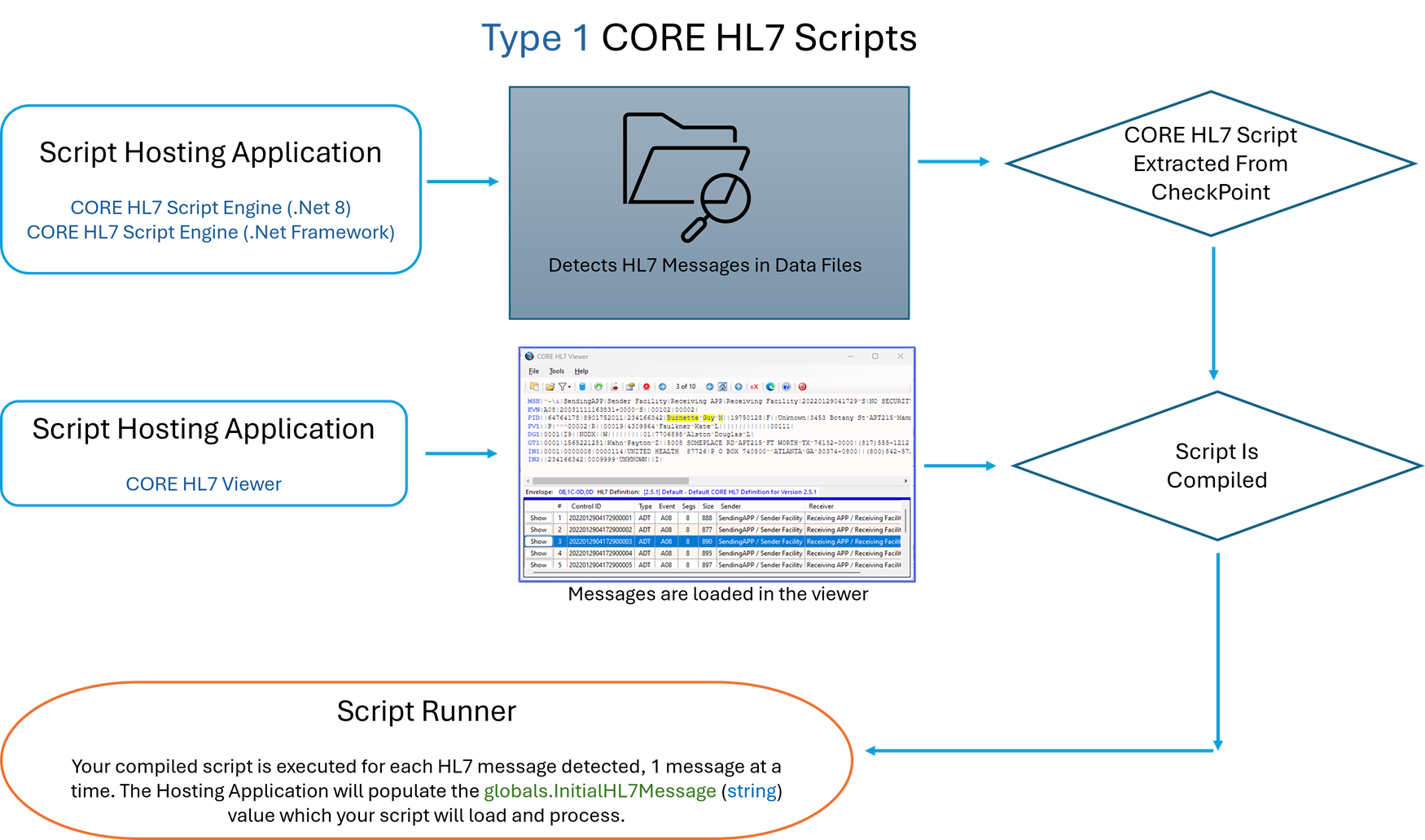 Type 1 Script Architecture
|
A Type 2 script is a script which will NOT have HL7 messages passed into it. This type of script you can write to perform one or more discrete actions and then EXIT (return), OR it can be designed to run "continuously" until the Script Hosting Application (in this case the CORE HL7 Viewer) tells it to STOP. The boundaries are really that of your own imagination.
/* This is an example of a TYPE 2 Script which will * process continuously in a persistent loop. * It will respond graciously to the Script Hosting application * requests to STOP and will also graciously YIELD during the loop * so that it doesn't just SPIN and use up CPU Resources unnecessarily * * BELOW are the using statements which are required */ using System; using COREHL7; using COREHL7ScriptHost; /* ABOVE are the using statements which are required */ using System.Collections.Generic; using System.Linq; using System.IO; using System.Xml; using System.Data; using System.Data.SqlClient; //.Net 8 Scripts will use Microsoft.Data.SqlClient using System.Text; /* ABOVE are the optional using statements you can include */
/* * Here we declare our globals object which we will set in our Execute() method. * By placing it here we can access it all throughout our script */ public static COREHL7Script globals;
/* You can create your own classes, variables, or methods here above this line */ public class Script { //This Script class is your MAIN class. It MUST be present to run
public void Execute(COREHL7Script parent) { //This Execute method in your Script class is your MAIN method. It MUST be present to run! globals = parent; try { /* Your Executable code goes in here below this line */ globals.Trace("Script is working and processing continuously......"); if (!COREScriptUtilities.IsFolder(globals.OutputFolder)) { //This directory checking is optional. If your script requires a folder you can verify it here. globals.SetException("Output folder is invalid or not set.", "Script()", 90882); /* * Here we set globals.Completed to false to tell the hosting application that we were unable * to continue because of an error. In this instance a CORE HL7 Script Engine will not run * the script again until the Error Restart timeout has expired */ globals.Completed = false; return; } /* * We now begin our loop */ while (true) { if (!globals.OpenHours.IsOpenNow()) { /* * If you have your script on a runtime schedule where for instance * you only want it to run between midnight and 6AM you can call this * global object. NOTE: Only used in a CORE HL7 Script Engine * * In this instance we can just set completed to true and return */ globals.Completed = true; //We might do a Trace() in case the user is running locally so that they can see something. globals.Trace("Script did not run. Not open until " + globals.OpenHours.StartingTime.ToShortTimeString()); return; } //Now I can do whatever I want for a single loop iteration.
//Example see the CountUpTo() method below for a simple idea. DateTime dtStart = DateTime.Now; int idx = CountUpTo(1000000); if (idx > 0) { DateTime dtEnd = DateTime.Now; TimeSpan ts = dtEnd - dtStart; //Do something globals.Trace("I counted up to " + idx.ToString() + " and it took " + ts.TotalMilliseconds.ToString() + " milliseconds"); } /* * If you have a complex script that has multiple classes or long running methods query this * StopAllProcessing value early and often to tell whether you need to break out of your process. */ if (globals.StopAllProcessing) { globals.Completed = true; return; }
/* * And finally in our loop we will call globals.Sleep() to cause a thread block on our script * for 10 milliseconds. */ globals.Sleep(); }
/* Your Executable code goes in here above this line */ } catch (Exception ex) { //This SetException method is your global method to handle exceptions globals.SetException("System Error: " + ex.Message, "RunScript()", 10201); globals.Completed = false; return; } } } //End of Script Class
/* You can create your own classes, variables, or methods here below this line */ public static int CountUpTo(int maxValue) { /* * This just to show how you can have a long running method that will * respond to StopAllProcessing */ int ret = 0; for (int i = 0; i < maxValue; i++) { ret++; if (globals.StopAllProcessing) { //I could just break; here OR I can return 0 //break; return 0; } } return ret;
} /* You can create your own classes, variables, or methods here above this line */
/* This line below MUST be the LAST line in your script */ return new Script();
|
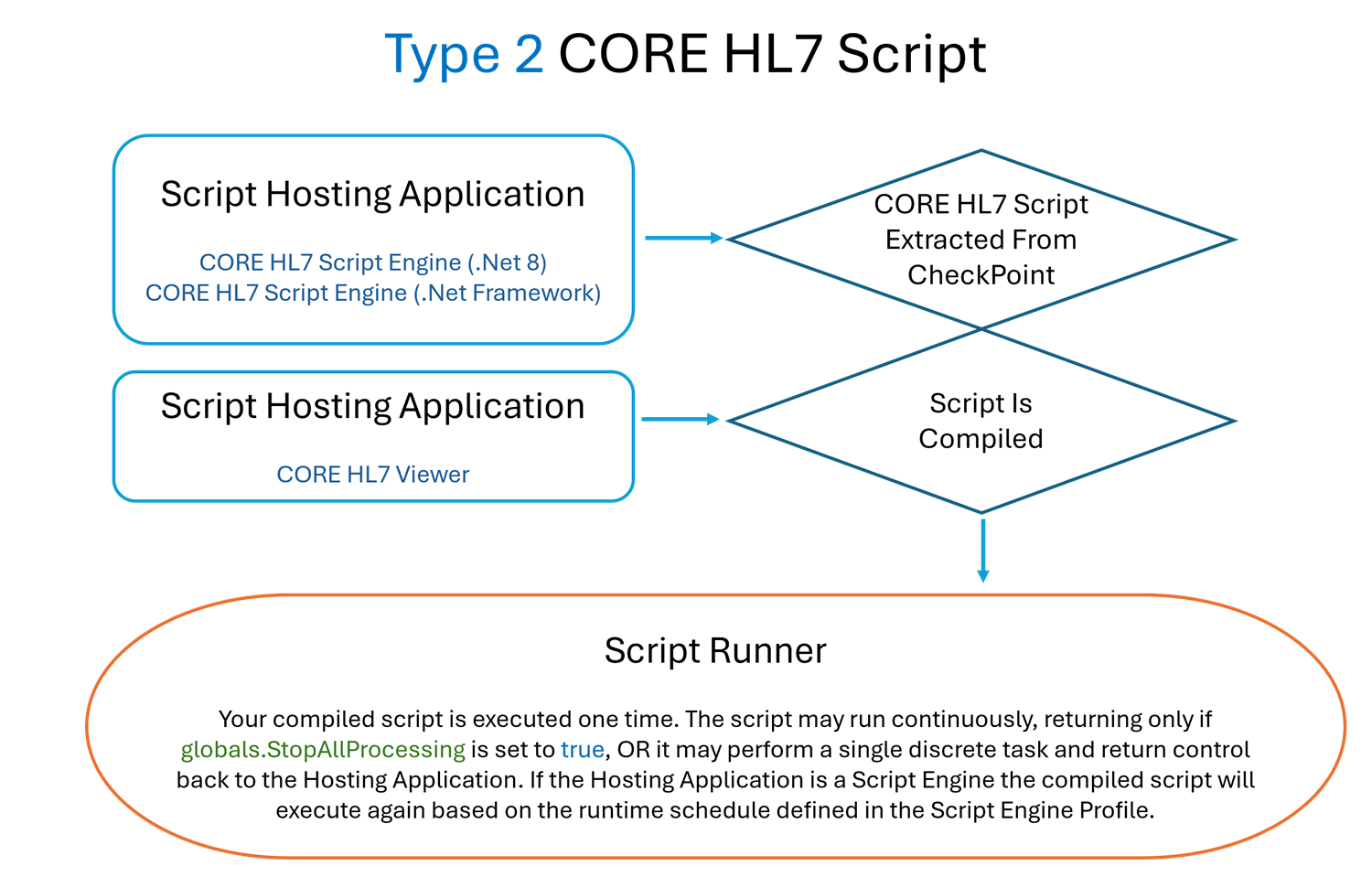 Type 2 Script Architecture
|
A Type 3 script is designed to run with a CORE HL7 Listener Hosting application. It will have a single HL7 message AND the Acknowledgement HL7 message passed into it by the hosting application.
/* This is an example of a TYPE 3 Script for the CORE HL7 Listener * which requires that the hosting application pass in the ListenerMessage * and the ACK HL7 message which it will act on. This type of script will only * process ONE (1) HL7 message and then exit. * * BELOW are the using statements which are required */ using System; using COREHL7; using COREHL7ScriptHost; /* ABOVE are the using statements which are required */ using System.Collections.Generic; using System.Linq; using System.IO; using System.Xml; using System.Data; using System.Data.SqlClient; //.Net 8 Scripts will use Microsoft.Data.SqlClient using System.Text; /* ABOVE are the optional using statements you can include */
/* * Here we declare our globals object which we will set in our Execute() method. * By placing it here we can access it all throughout our script */ internal static COREHL7Script globals; /* MyMessage we will set to globals.ListenerMessage which will be the * HL7 message object passed in the CORE HL7 Listener */ internal static CHS_Message MyMessage; /* MyAck we will set to globals.ListenerAck which will be the * HL7 message object for the Acknowledgement passed in the CORE HL7 Listener. * NOTE: This MAY be null so check it and recreate it if needed */ internal static CHS_Message MyAck;
/* You can create your own classes, variables, or methods here above this line */ public class Script { //This Script class is your MAIN class. It MUST be present to run public void Execute(COREHL7Script parent) { //This Execute method in your Script class is your MAIN method. It MUST be present to run! globals = parent; MyMessage = globals.ListenerMessage; MyAck = globals.ListenerAck; try { /* Your Executable code goes in here below this line */ globals.Trace("Listener Script is working......", false); //The ListenerMessage will be our HL7 message if (MyMessage == null) { //This should NEVER happen unless running the Script Engine which will ignore the Listener and ACK messages globals.SetException("No action required.No initial Listener message", "Script()", 321342); /* When we call globals.SetException() it will automatically generate both a Trace() event * for Runtime Windows and a LogIt() event to log the error IF the Logs folder has been set. */ globals.Completed = true; /* * We set globals.Completed to true to tell the hosting application that we have processed the * message to the fullest extent that we can and then return. */ return; } globals.Trace("Script is evaluating Message [" + MyMessage.MessageControlID + "]....", false); globals.Trace("Send ACK is currently: " + globals.AcknowledgementSettings.SendTheAcknowledgement.ToString(), false); //At this point we can do whatever we like to validate our HL7 message. //In this instance I will verify that there is a value in the PID segment //Field 3 Component 1 (Patient ID). If Not I will reject the message CHS_Segment pid = MyMessage.GetFirstSegmentNamed("PID"); if (pid == null) { //Reject the message because there's no PID segment globals.TraceLog("Rejecting Message [" + MyMessage.MessageControlID + "] - No PID Segment"); globals.RejectListenerMessage("No PID Segment detected"); globals.Completed = true; return; } CHS_Field pid3 = pid.GetFieldToEdit(3); string pid31 = pid3.GetComponentValue(1); if (string.IsNullOrEmpty(pid31)) { //Reject the message because there's no Patient ID in PID Field 3.1 globals.TraceLog("Rejecting Message [" + MyMessage.MessageControlID + "] - No Patient ID in PID 3.1"); globals.RejectListenerMessage("No Patient ID in PID 3.1"); globals.Completed = true; return; } //I can verify the ACK message is there AND create / recreate it if needed if (MyAck == null) { globals.Trace("Creating ACK for Message [" + MyMessage.MessageControlID + "]", false); //Create the globals.ListenerAck message if (!MyMessage.MakeAcknowledgement()) { globals.SetException("Error creating ACK message!", "Script()", 54321); globals.Completed = false; return; } MyAck = globals.ListenerAck; } //I can even make changes to the ACK Message. Here I will ADD a PID segment //Identical to the PID segment in the original message. CHS_Segment ackPID = MyAck.AddFullSegment(pid.SegmentValue()); //If I make changes to the ACK I need to commit the ACK globals.CommitAcknowledgement(MyAck);
/* * If we are done typically you would want to call CommitMessage() and let the * script hosting application (CORE Listener) do whatever needs to be done with the message * (Typically, this means writing to the OutputFolder) */ globals.CommitMessage(MyMessage);
//Tell the hosting application that we are done. globals.Completed = true; //Return and get called again with the next HL7 message received. return;
/* Your Executable code goes in here above this line */ } catch (Exception ex) { //This SetException method is your global method to handle exceptions globals.SetException("System Error: " + ex.Message, "RunScript()", 10201); globals.Completed = false; return; } } } //End of Script Class
/* You can create your own classes, variables, or methods here below this line */ /* You can create your own classes, variables, or methods here above this line */
/* This line below MUST be the LAST line in your script */ return new Script();
|
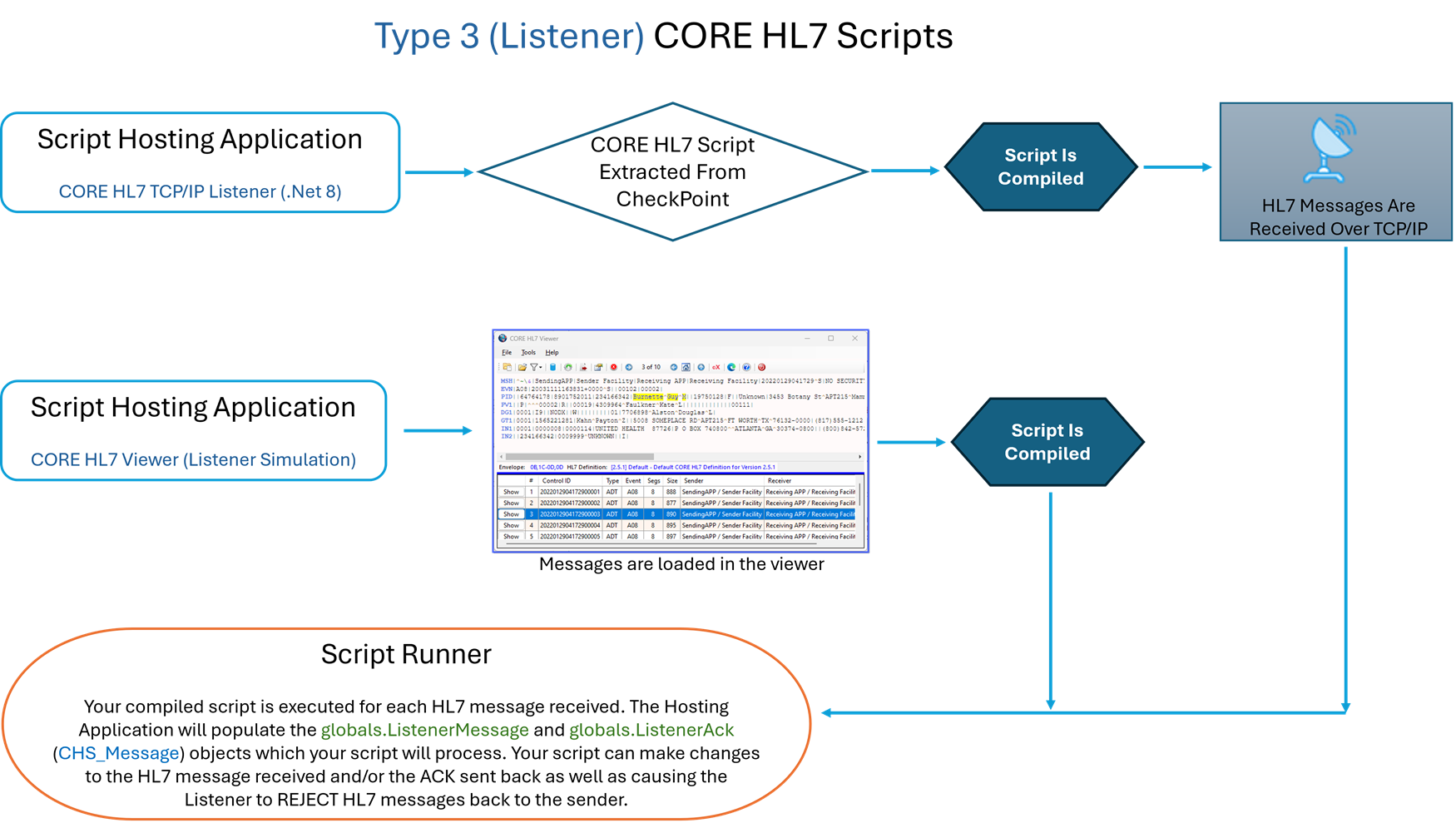 Type 3 Script Architecture
|

Create Scripts for the CORE HL7 Listener
