CORE HL7 Postmaster

Created with the CORE HL7 API Libraries for .Net 8
The CORE HL7 Postmaster has 3 different interfaces to MS SQL HL7 Database Schemas created with our CORE HL7 MS SQL Schema Engine software. You can download that software from our website (click Downloads) or review the online help. They are:
•CORE MS SQL Message Assemblers (also a Data Source).
In every one of those objects you will see the need to create a CORE MS SQL Schema Connector. Example below.
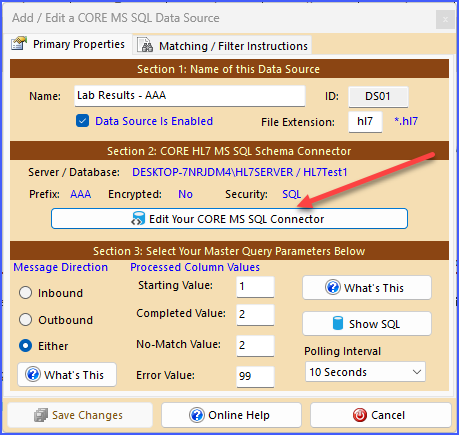
SQL Data Source Example
Clicking the button indicated above will open the CORE MS SQL Schema Connector window.
If you want to use one of the CORE MS SQL Schema Engine interfaces we assume that you have at least a passing understanding of how it works. So the absolute EASIEST way to complete this form is to pull up your CORE MS SQL Schema Engine software and Edit the Schema Profile for the database schema you want to connect to and then just COPY all of the common data elements from Part 1. See the Example below.
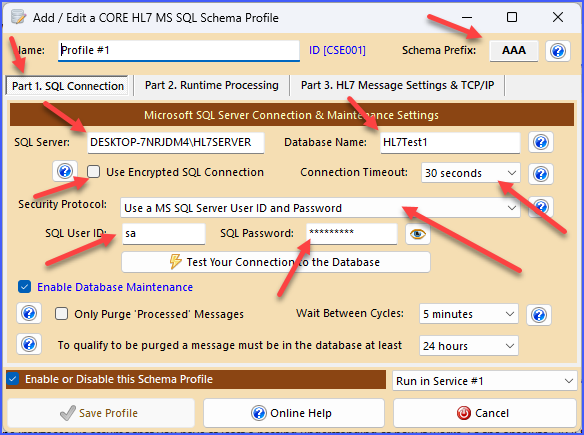
CORE SQL Schema Engine Edit Profile
Just copy all of the matching settings from your CORE MS SQL Schema Engine profile into the CORE MS SQL Schema Connector window.
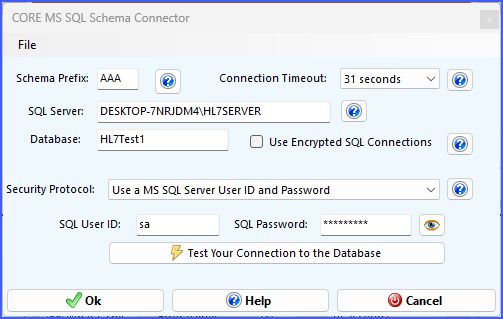
Creating a CORE SQL Schema Connector
Some other things to know about the CORE MS SQL Schema Connector window.
If you click the File menu you can either Export your SQL Connector to disk OR you can Open a SQL Connector you have previously saved. NOTE: When you export a SQL Connector to disk any Password information is encrypted.
After completing your edits click  Test Your Connection to the Database to make sure that everything has been entered correctly and that a CORE HL7 MS SQL Database Schema Exists. Then click the
  Ok button to save your changes.
