

Access your Script Library from the Tools menu of your script hosting application.

Create a new script (Script Engine)
To create a NEW script click the  or
or  button on the toolbar OR select Create a New Script from the File menu.
The Script Library will prompt you with the New Script Window
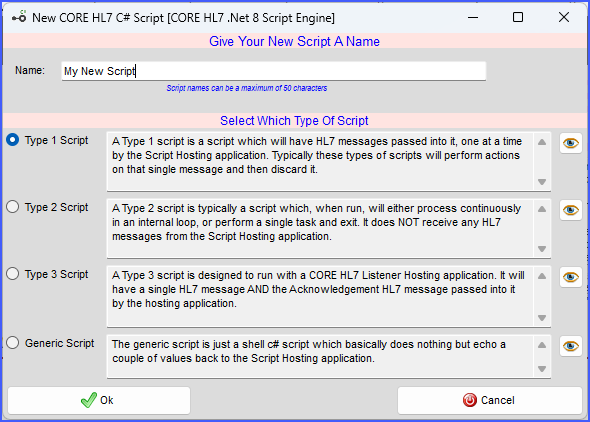
Create a new script (Script Engine)
The Script Library will automatically create the new script using the name you entered with the default starting C# code you selected.

New Script Created
Now you are ready to edit your script. To edit an existing script just select the script in the library items list and then click the Edit button on the right hand toolbar to open the Compiler window.

The CORE HL7 Script Compiler Window
While you CAN edit your script directly in the Compiler window you will probably only want to use it for very simple changes or tweaks because, while attractive, it's not a very good code editor. WHY? Because other companies have spent millions of dollars developing and perfecting C# code editors which are available for FREE (see the video here) and we concentrated our resources on providing the Compiling and Running features.
In the Compiler Window you also set other Script Properties like Files and Folders and SQL Connectors (for either MS SQL or MySQL) which your script may access.

Files and Folders
Click the Additional Script Properties tab to access Files and Folders and the Script Description. In this tab you can set:
•The Output Folder
•The Logs Folder
•The Error Folder
•The Configuration File
•The Script Description / Notes
 NOTE: With the exception of the Script Description the Output Folder, Logs Folder, Error Folder and Configuration File SCRIPT properties are OVERRIDDEN in your Script Engine Profile.
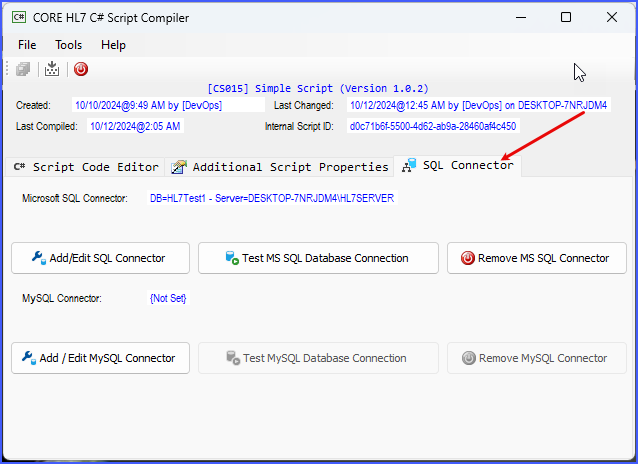
SQL Connector(s)
Click the SQL Connector tab to access your script's database connectors (if needed). In this tab you can create a connector for Microsoft SQL Server and / or MySQL.
NOTE: The Microsoft SQL and MySQL Connectors that are configured in your script will be OVERRIDDEN in your Script Engine Profile.
Download Example Scripts in CheckPoint files (zip file)
