CORE HL7 Postmaster

Created with the CORE HL7 API Libraries for .Net 8
You create Transformation Instructions to modify HL7 messages. Transformation Instructions are ONLY available on HL7 Destinations (with the exception of the Rubbish Bins).
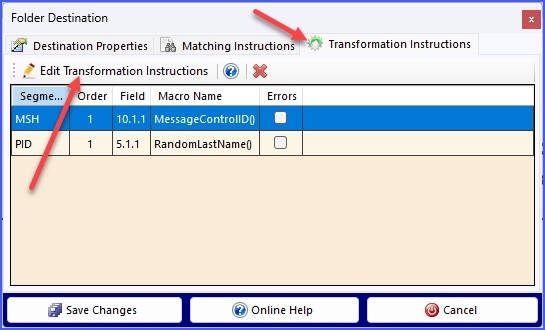
Getting to the Matching Instructions
You gain access to view / edit the Transformation Instructions for any Postmaster Destination which supports them in the same way. Edit the Destination and then go to the Transformation Instructions tab and click the  Edit Transformation Instructions button to open the CORE HL7 Transformation Scripts window. If there are Transformation Instructions already present on a Destination you can remove them by clicking
  on the toolbar.
If your Postmaster object is a Destination which also has Matching Instructions be aware of the fact that Matching Instructions are ALWAYS evaluated BEFORE Transformation Instructions.
Now just follow the instructions in the YouTube video below.

Creating and Editing HL7 Transformation Instructions

When you use Transformation Instructions in one of your HL7 Destinations you can add instructions to remove entire HL7 segments from the HL7 message. Here's how:
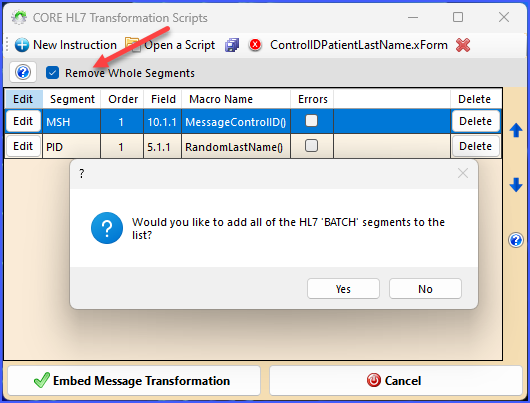 Removing Whole Segments - Step 1
When you Edit your Transformation Instructions you will see a check box which says Remove Whole Segments. When you check this box it allows you to create a list of HL7 segments you want the Transformation Instructions to remove.
When you check the box for the first time, before you enter anything, it will ask you: Would you like to add all of the HL7 'BATCH' segments to the list? If you click Yes here it will automatically add the 4 HL7 segment names that deal with the old "batch HL7 message" data file format (BHS, BTS, FHS, FTS) to your list of HL7 segments you would like removed from all messages.
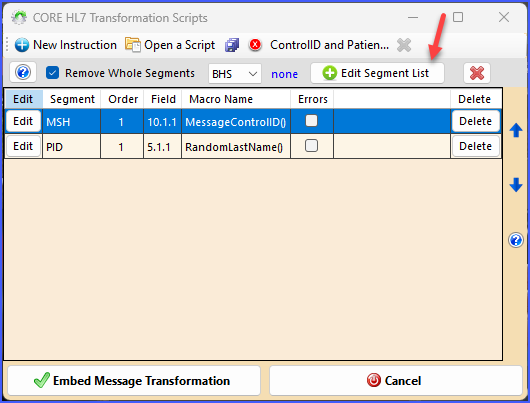 Removing Whole Segments - Step 2
After you have checked the box you can edit your list of HL7 Segment names by clicking the
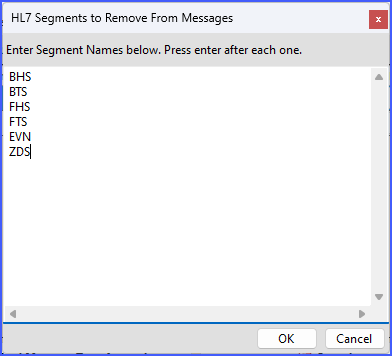 Removing Whole Segments - Step 3
When you click the
NOTE: There are 3 protected HL7 segments which you CANNOT remove using this method. They are the MSH, MSA, and PID segments. If you enter any of these segment names they will be ignored. Likewise any duplicate entries or invalid HL7 segment names will be ignored.
Valid HL7 Segment names are 3 Alpha-numeric characters long and are always upper case (we will automatically force to upper case when you click OK).
Click OK when you are done editing your list.
|

CORE HL7 Transformation Macros Version 1.0.2
Macro: Blank() Parameters: 0 Instructions: Clears the component value
Macro: DateStamp() Parameters: 0 Instructions: Replaces the value with the current system date (yyyymmdd)
Macro: DateTimeStamp1() Parameters: 0 Instructions: Replaces the value with the current system date and time to the minute (yyyymmddhhmm)
Macro: DateTimeStamp2() Parameters: 0 Instructions: Replaces the value with the current system date and time to the second (yyyymmddhhmmss)
Macro: DefaultValue(value) Parameters: 1 Parameter #1: value [String] Instructions: Replaces the component value with the value passed in parameter 1 [value] ONLY if the selected component value is empty
Macro: GUID() Parameters: 0 Instructions: Replaces the component value with a system Globally Unique Identifier (guid)
Macro: HL7Null() Parameters: 0 Instructions: Replaces the component value with an HL7 explicit NULL ("").
Macro: MessageControlID() Parameters: 0 Instructions: Replaces the component value with a HL7 Compliant value for MSH 10.1
Macro: PadLeft(numberOfCharacters, padCharacter) Parameters: 2 Parameter #1: numberOfCharacters [Number] Parameter #2: padCharacter [String] Instructions: Increases the length of the component value to [numberOfCharacters] characters in length by padding to the left with [padCharacter]. If padCharacter is omitted spaces are used. If the original value is equal to or longer than [numberOfCharacters] characters in length it will be left unchanged.
Macro: PadRight(numberOfCharacters, padCharacter) Parameters: 2 Parameter #1: numberOfCharacters [Number] Parameter #2: padCharacter [String] Instructions: Increases the length of the component value to [numberOfCharacters] characters in length by padding to the right with [padCharacter]. If padCharacter is omitted spaces are used. If the original value is equal to or longer than [numberOfCharacters] characters in length it will be left unchanged.
Macro: Prefix(strPrefix) Parameters: 1 Parameter #1: strPrefix [String] Instructions: Adds the value passed in parameter 1 [strPrefix] to the beginning of the component value
Macro: RandomAge(intMinimumYears, intMaximumYears) Parameters: 2 Parameter #1: intMinimumYears [Number] Parameter #2: intMaximumYears [Number] Instructions: Replaces the value with a random date from the past which (if evaluated as a date of birth) would result in the person's age being between [intMinimumYears] to [intMaximumYears] old (formatted yyyymmdd)
Macro: RandomCityName() Parameters: 0 Instructions: Replaces the value with a random city name from an internal database of over 1000 city names
Macro: RandomFemaleFirstName() Parameters: 0 Instructions: Replaces the component value with a random female gendered first name selected from an internal list
Macro: RandomFirstName() Parameters: 0 Instructions: Replaces the component value with a random first name (male or female) selected from an internal list
Macro: RandomLastName() Parameters: 0 Instructions: Replaces the component value with a random surname selected from an internal list
Macro: RandomMaleFirstName() Parameters: 0 Instructions: Replaces the component value with a random male gendered first name selected from an internal list
Macro: RandomNumber(value) Parameters: 1 Parameter #1: value [Number] Instructions: Replaces the component value with a random number <value> digits long
Macro: RandomPastDate(intNumberOfYears) Parameters: 1 Parameter #1: intNumberOfYears [Number] Instructions: Replaces the value with a random date from the past with a maximum of [intNumberOfYears] old
Macro: RandomPastDateTime(intMinimumDays, intMaximumDays) Parameters: 2 Parameter #1: intMinimumDays [Number] Parameter #2: intMaximumDays [Number] Instructions: Replaces the value with a random datetime from the range [intMinimumDays] to [intMaximumDays] in the past formatted yyyymmddhhmm
Macro: RandomSelection(CommaDelimitedList) Parameters: 1 Parameter #1: CommaDelimitedList [String] Instructions: Replaces the component value with a random selection from the item list in parameter 1 [CommaDelimitedList] which must be a comma delimited list of items (Example: Lab1, Lab2, Lab3).
Macro: RandomSSN() Parameters: 0 Instructions: Replaces the value with a randomly generated 9 digit number formatted as USA social security number 'nnn-nn-nnnn'
Macro: RandomState() Parameters: 0 Instructions: Replaces the value with a random U.S. State abbreviation.
Macro: RandomStreetAddress() Parameters: 0 Instructions: Replaces the value with a random 4 digit street number and a random street name from an internal database with over 2000 unique street names.
Macro: RandomString(value) Parameters: 1 Parameter #1: value [Number] Instructions: Replaces the component value with a random character string <value> characters long
Macro: RandomTelephone() Parameters: 0 Instructions: Replaces the value with a randomly generated 10 digit number formatted as USA telephone number '(nnn) nn-nnnn'
Coming Soon! - This macro is not available in this version. Macro: RandomValueSet(value) Parameters: 1 Parameter #1: value [ValueSet] Instructions: Replaces multiple segment values with a random selection from a list of ValueSets passed in parameter 1 [value]
Macro: Scrub(strScrubValue) Parameters: 1 Parameter #1: strScrubValue [String] Instructions: Removes ALL instances of the value passed in parameter 1 [strScrubValue] from the component data. NOTE: Parameter 1 is NOT case-sensitive. Example: If parameter 1 is ABC then the component value ABCDEF would be changed to DEF, component value AbCdEf would be changed to dEf.
Macro: StaticValue(value) Parameters: 1 Parameter #1: value [String] Instructions: Replaces the component value with the value passed in parameter 1 [value]
Coming Soon! - This macro is not available in this version. Macro: StaticValueSet(value) Parameters: 1 Parameter #1: value [ValueSet] Instructions: Replaces multiple segment values with a single static ValueSet passed in parameter 1 [value]
Macro: SubString(intStartingPosition, intNumberOfCharacters) Parameters: 2 Parameter #1: intStartingPosition [Number] Parameter #2: intNumberOfCharacters [Number] Instructions: Replaces the component value with a substring beginning at position [intStartingPosition] and extending to position [intNumberOfCharacters]. If the optional second parameter [intNumberOfCharacters] is omitted then the entire value from position [intStartingPosition] is returned.
Macro: Suffix(strSuffix) Parameters: 1 Parameter #1: strSuffix [String] Instructions: Adds the value passed in parameter 1 [strSuffix] to the end of the component value
|
