CORE HL7 Postmaster

Created with the CORE HL7 API Libraries for .Net 8
If your Postmaster license does not allow you to install or run the Postmaster MS Windows Services (see How Licenses Work) you can only run your Postmaster profiles one at a time "Locally" in a runtime window. This is also the best method you can use to TEST your Postmaster to make sure that everything is working properly because you can actually watch the Postmaster run.
To Run Locally.
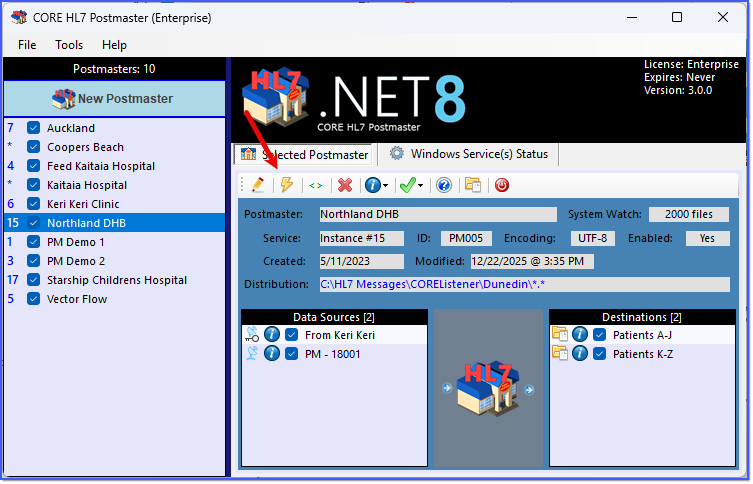
Running Locally
From the Main Window click the  button on the toolbar in the Selected Postmaster tab. This will prompt a Validation Routine and then bring up the Run Locally window.
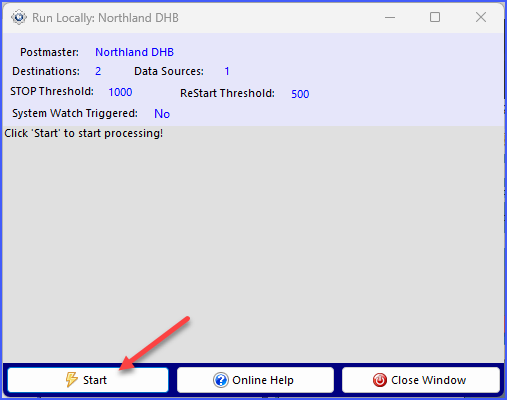
Running Locally - Click Start
To get going click the Start button, the Close Window button text will change to Cancel and your runtime session will begin.
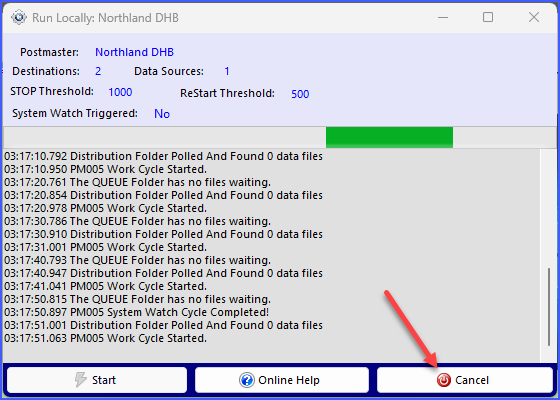
Running Locally - Click Cancel to Stop
Once running you stop the session by clicking the  Cancel button.
See Next: Running as a Service, Private Services
