
Created with the CORE HL7 API Libraries for .Net 8
When you start the CORE HL7 Postmaster for the first time the first thing that you will have to do is sort out your license. This has to be done before you can access the main program. If you have no license, or for some reason your license becomes invalid, you will be presented with this window when you start the program. Just click Activate A License (Permanent or Demo) to get started!

Activating a License
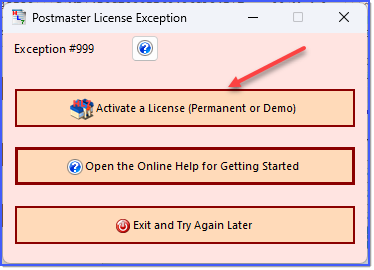
License Activation Step 1
Open the appropriate section below for the steps required for each type of license activation.

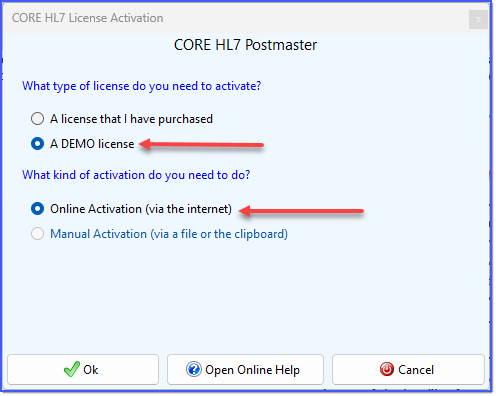 Demo License Activation Step 2
Just check A DEMO license and Online Activation and click
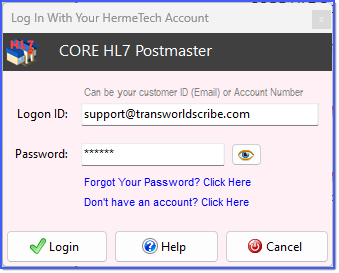 Step 3 - Log In
Next you will be prompted to log in with your HermeTech Account. If you do not have a HermeTech Account just click Don't have an account? Click Here and you will be taken to our website to create your account. If you have forgotten your password just click Forgot Your Password? Click Here and you will be taken to our website to recover your password.
In the Logon ID field you can type in either your Customer ID (email address) OR your 8 digit HermeTech Account number. Enter your account password in the Password field. Passwords are NOT case-sensitive. Your HermeTech Account contains only the basic information necessary to create a license repository for you and your company, we do NOT maintain or store any financial or payment information (like credit card numbers, etc).
After you have entered your login information click
If you encounter an exception you can always Contact Customer Service.
What can go wrong? Below is a list of the most common exceptions encountered by customers. Most can be easily resolved.
1.Our program cannot access our license server over the internet. Causes: While it is certainly possible that our web service is down for some reason, the most likely cause here is that our program (the CORE HL7 Postmaster) is being blocked by security on the computer / server. Remember that just because a computer / server has internet connectivity, it may be reserved only for the Web Browsers and certain other programs. Possible Resolution(s): You can try a few things like, running the Postmaster program (COREHL7PostmasterConfig.exe) as an Administrator. You can have someone from the Network Administrators group log in to the computer / server and try to activate the license. You can contact the Network Security group and have them make an exception in the firewall to ALLOW our program to access the internet, if only for a few minutes, until you can get your license activated. 2.Our program CAN access our license server BUT we cannot create the license file (License.COREHL7Postmaster.txt) in the program's installation folder. Cause: User Rights. Your Windows logon does not have sufficient "rights" to create files in the installation folder. As explained in the System Requirements, all of OUR programs (the configuration program AND the MS Windows Services) MUST have full rights to the installation folder and all sub-folders. Your CORE HL7 Postmaster stores profiles and creates system logs in this folder. Resolution: Contact the Network Admin and explain the situation and have them either provide you with the necessary rights OR they can configure our software to run as a User which does have rights. 3.Problems 1 and 2 do not apply, but there has already been a DEMO license created for the computer / server by another HermeTech Account. Cause: There's no secret code here, it means that someone else has already created a DEMO license for the computer / server. If it was not you, and you don't know who created the DEMO license you can always contact us to help resolve this scenario.
|

If you do not yet own a license for the CORE HL7 Postmaster see How To Buy!
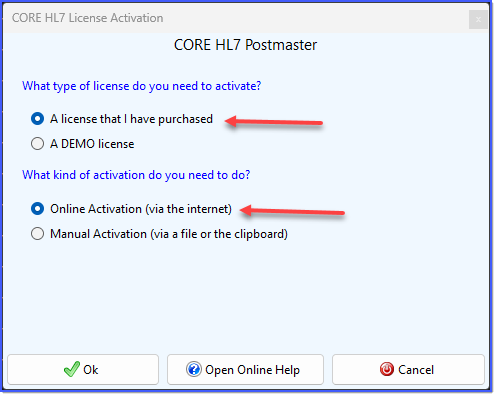 Online Activation Step 2
Just check A license that I have purchased and Online Activation and click
Step 3 - Log In
Next you will be prompted to log in with your HermeTech Account. If you do not have a HermeTech Account just click Don't have an account? Click Here and you will be taken to our website to create your account. If you have forgotten your password just click Forgot Your Password? Click Here and you will be taken to our website to recover your password.
In the Logon ID field you can type in either your Customer ID (email address) OR your 8 digit HermeTech Account number. Enter your account password in the Password field. Passwords are NOT case-sensitive. Your HermeTech Account contains only the basic information necessary to create a license repository for you and your company, we do NOT maintain or store any financial or payment information (like credit card numbers, etc).
After you have entered your login information click
If you encounter an exception you can always Contact Customer Service.
What can go wrong? Assuming that you have entered your login credentials correctly below is a list of the most common exceptions encountered by customers in this step. Most can be easily resolved.
1.Our program cannot access our license server over the internet. Causes: While it is certainly possible that our web service is down for some reason, the most likely cause here is that our program (the CORE HL7 Postmaster) is being blocked by security on the computer / server. Remember that just because a computer / server has internet connectivity, it may be reserved only for the Web Browsers and certain other programs. Possible Resolution(s): You can try a few things like, running the Postmaster program (COREHL7PostmasterConfig.exe) as an Administrator. You can have someone from the Network Administrators group log in to the computer / server and try to activate the license. You can contact the Network Security group and have them make an exception in the firewall to ALLOW our program to access the internet, if only for a few minutes, until you can get your license activated. Otherwise, use Manual Activation. 2.The HermeTech account credentials you entered does not own any licenses. You will see the error below. See How To Buy if you need to purchase licenses for this software OR login using credentials for an account that does own a license you can activate. 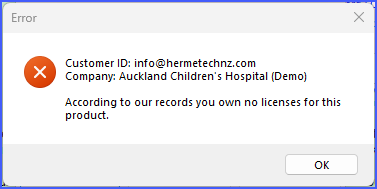
Final Step - After you have logged in AND you own licenses for this software you will next be prompted to choose which license you want to activate.
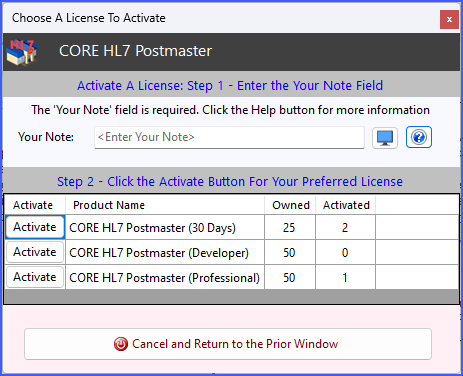 Step 4 - Choose License To Activate
Now we are at the final step, all you have to do in this window is:
1.Enter the Your Note field. The Your Note field is a short description of this particular installation. It will show up in your CORE License Manager software and you use it if you need help (customer service) for a particular installation. You can click the 2.Click the Activate button next to the license you want to activate for the computer / server.
You will be prompted to confirm your selection and once you do that your will be activated and saved into the installation folder as (License.COREHL7Postmaster.txt), and you will be taken to the Main Window to start working with your CORE HL7 Postmaster!
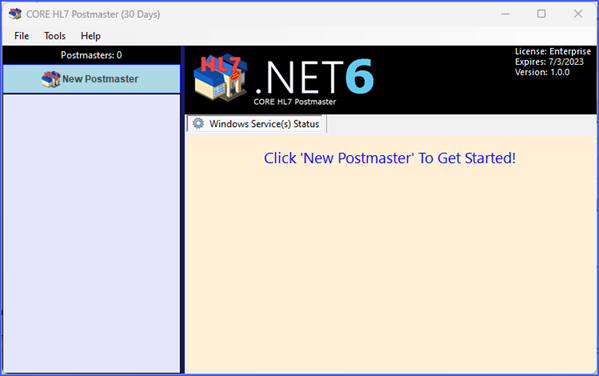 Activation Done! Ready to Work!
|

 button to add the default Your Note value.
In some scenarios you will need to do a Manual Activation, this is for things like:
•The computer / server running the CORE HL7 Listener is not connected to the internet. •You are upgrading your current license. •You are submitting a license move request.
Manual License Activations
Manual Activation always requires the use of the CORE License Manager software which must be installed on a computer which does have internet access and will allow the CORE License Manager software to log in. You can download the CORE License Manager software from our website OR you download it directly HERE.
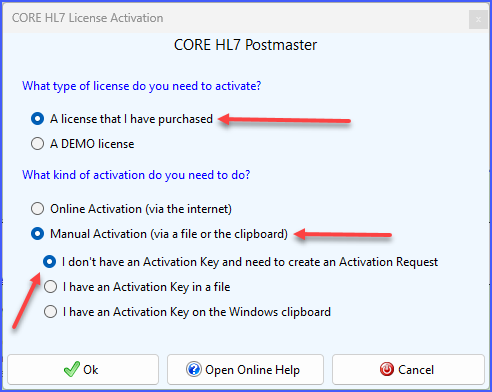 Manual Activation Step 2
For your next step you need an Activation Request. Just check the boxes indicated and click
STEP 3. You will then take that activation request to the computer running the CORE License Manager software (save the Activation Request into a plain TXT file if you need to) and follow the instructions in THAT help document to activate a license.
STEP 4. Once you have activated your license in the CORE License Manager you will need to retrieve your license activation key, bring that BACK to the original computer (either in a file or on the clipboard) and then start from the top of this page again, this time choosing Manual Activation and select the appropriate box.
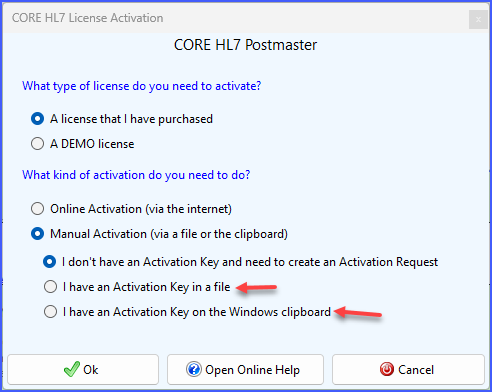 Manual Activation Step 4
After you do this and click
Activation Done! Ready to Work!
|
