CORE HL7 Postmaster

Created with the CORE HL7 API Libraries for .Net 8
Coming in Version 1.5!
To edit the Master Client Credentials list, go to the Main Window and in the Tools menu click  Edit IPSec Listener Client Credentials.

To edit an existing credential click the Edit button. To permanently delete a credential click the Delete button. Clicking the Copy button will copy the Client ID and Password to the Windows clipboard to easily paste into an email or document to provide to the client with connection instructions.
To add a new credential click the Click Here To Add A New Credential button which will open the Add / Edit Window.
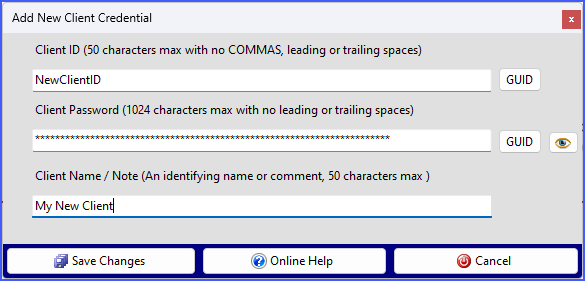
A client credential only has 3 fields:
1.Client ID - 50 characters max
2.Client Password - 1024 characters max
3.Client Name / Note - 50 characters max
You can only change the Client ID when you are first creating the credential. After that, if you edit the credential this field will be read-only.
If the Client ID field or Client Password field is EMPTY you can click the corresponding GUID button which will insert a GUID (Globally Unique Identifier) string into the field. This allows you to create credentials that are complex and identity obfuscated in the ID and Password fields while you use the Client Name / Note field to easily identify which credential belongs to which client. When you have completed your edits click the  Save Changes button.
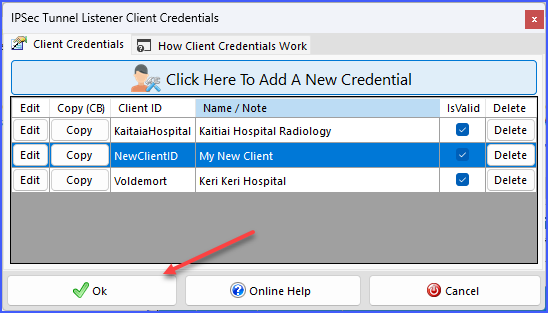
When you add or edit a credential, in the Master list the button becomes enabled. Click the  Ok button to save changes to disk.
See Also: IPSec Tunnel Listener.
