Run a Schema Profile Locally

Running Locally
To "Run Locally" means to execute a Schema Profile in an immediate window. If your software license is a DEMO license or a DEVELOPER license then you MUST run locally because you cannot install or run the MS Windows Services.
Run a profile 'Locally' by clicking the  button in the Schema Profile section of the Main Window to bring up the Execute Locally window (see below).

Click Start Running This Profile
When you click  Start Running This Profile it will begin processing everything associated with your Schema Profile SIMULTANEOUSLY, including:
•Examining every folder / file extension pair you selected as your Folder data source(s) (Your Schema Profile Part 2) for HL7 data files.
•IF you enabled the TCP/IP MLLP Listener (Your Schema Profile Part 3), it will begin listening on the port # you selected.
•IF you enabled database maintenance (Your Schema Profile Part 1), it will begin executing database maintenance cycles.

Local Execution - Running
As your process runs you will see progress as the trace window scrolls messages and you can see your counters advancing in the top part of the window.
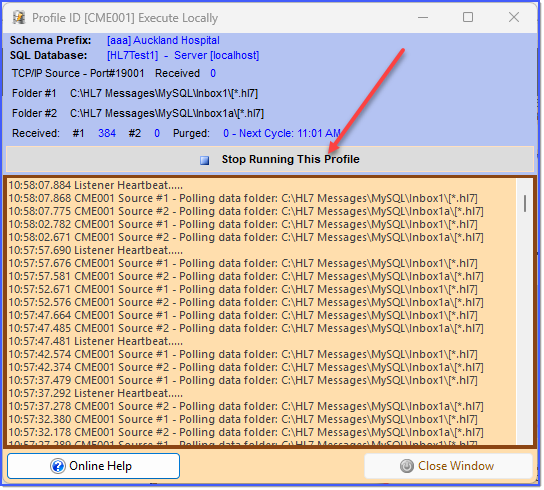
Local Execution - Stop Running
When you are finished running locally just click  Stop Running This Profile and close the window.