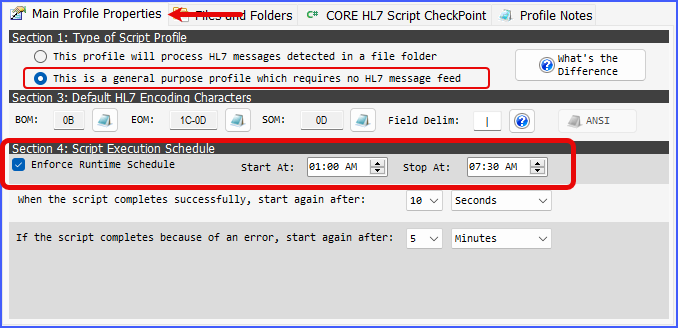
CORE Script Engine Profile Main Properties
The OfficeHours class is a very simple object. Access in all CORE HL7 C# Scripts through globals.OpenHours. You can only set the values for this object by checking the Enforce Runtime Schedule box in a CORE HL7 Script Engine profile.
You can set the globals.OpenHours on all Type 2 scripts in a CORE HL7 Script Engine implementation. For Type 1 scripts the globals.OpenHours will be set to be "Open" 24/7 because those scripts work on only 1 HL7 message at a time which are fed to them by the Script Hosting Application. This means that when running a CORE Script in your CORE HL7 Viewer software this value is left to the default settings which is "Open" 24/7.
NOTE: While you set the globals.OpenHours values in your Script Engine profiles it is in the SCRIPT itself that you have to actually reference and comply with it. In the example scripts you can download look at Example 1.

Public Properties:
Property Name |
Data Type |
StartingTime |
DateTime (read only) - Will be the starting time of Open Hours. The default setting is midnight. |
EndingTime |
DateTime (read only) - Will be the starting time of Open Hours. The default setting is midnight. When StartingTime and EndingTime are the same that means "Open" time is 24 hours a day. |
Public Methods:
Method |
Return Value |
IsOpen(DateTime value) |
bool- Pass a valid DateTime in value and will return true if it's "Open" at that time, false if not. |
IsOpenNow() |
bool- Will return true if it's "Open" right now (System.DateTime.Now), false if not. |
