Effective with version 1.1 you can assign your Script Engine Profile(s) to run in a Private Service.
 What Is A Private Service? It's just like it sounds. A Private Service is a CORE HL7 Script Engine windows service which will only run one (1) Script Engine Profile.
Why Would I Need This? If you have many Script Engine Profiles, you might want to "carve out" an individual profile to run in a service all by itself. This can be especially true if you are testing and you want to have a profile run in a service BUT you want to be able to start and stop JUST that profile without having to start and stop all of your other profiles.

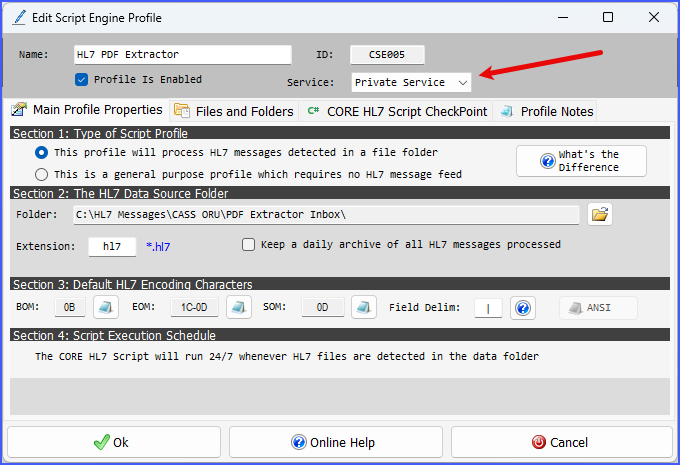
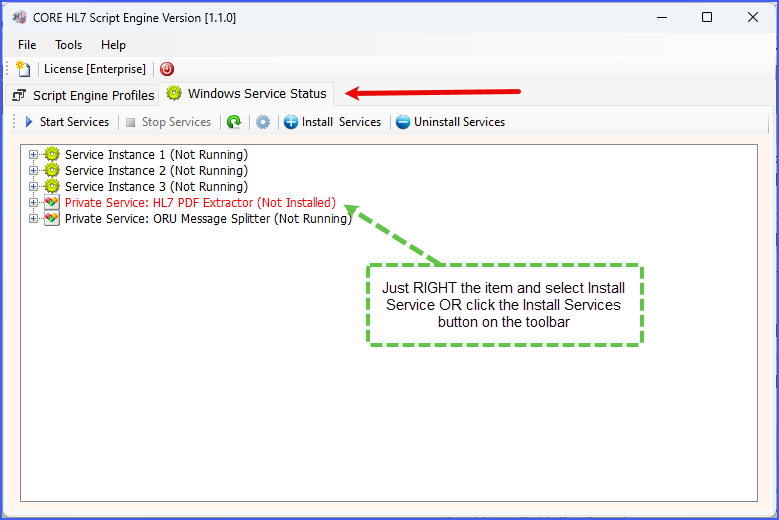
Some notes about running Private Services.
1. Be frugal. Every Windows Service that runs has some basic memory and CPU overhead. This means that if you have 30 Script Engine Profiles and you assign all of them to run in Service Instance 1 that service will consume it's BASE memory requirement PLUS whatever memory and CPU each Script Profile actually consumes. If you take the same 30 profiles and assign 1 each to Service Instances 1-3 and then create 27 Private Services you will effectively 30 different Service instances each of which has a separate BASE memory and CPU requirement. Think of it as the difference between opening the Microsoft EDGE browser with 30 tabs open vs opening 30 different Microsoft EDGE instances each with 1 tab open.
2. In and Out. Remember that when you transfer a Script Engine Profile FROM Service Instance 1-3 TO a Private Service that you want to make sure that you restart the Service Instance that you transfer FROM. We do some internal checking to force this, but it is possible.
3. Profile Editing Limitations. You will notice that when you assign a Script Engine Profile to a Private Service and THEN go back to edit that profile there are some restrictions. After your profile is assigned to a Private Service AND you have installed that Private Service in your Windows Services you can no longer:
•Change the Profile Name
•Disable the Profile
•Reassign the Profile to Service Instance 1-3 OR Unassigned.
To remove these restrictions you will have to Uninstall the Private Service by going to the Windows Service Status Tab, Right Click on the Private Service and choose Uninstall Service (if the Private Service is running you will need to stop it first).
