End-To-End SSL / TLS Encryption
Starting with version 3.5 of the CORE HL7 Listener you can attach a SSL / TLS X.509 certificate to your CORE HL7 Listener profile to enable point to point encryption. See Also: Technical Specifications for SSL.

Create a SSL/TLS Encrypted HL7 Listener




 and
and  to
to  .
.
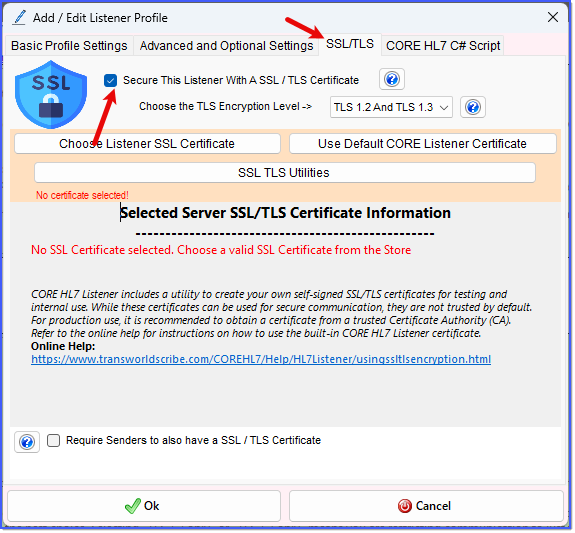
SSL / TLS Settings Enable SSL
To enable SSL / TLS simply go to the SSL/TLS tab in your Add / Edit Listener Profile window and check the Secure This Listener With a SSL / TLS Certificate box. The first thing you will do is choose the TLS Encryption Level from the dropdown box.
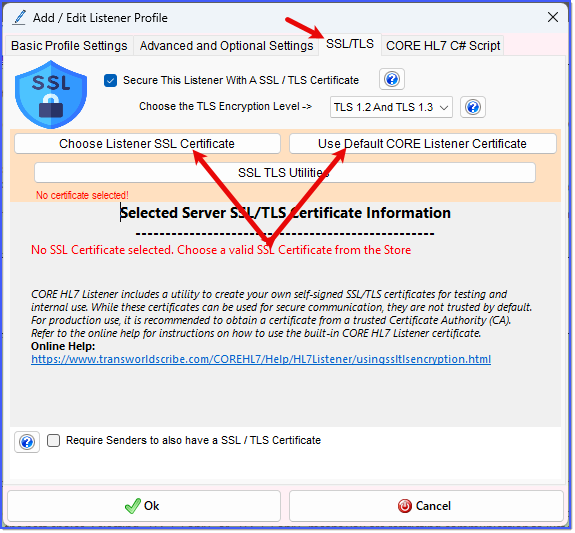
SSL / TLS Settings Choose Certificate
Next, you choose the SSL / TLS certificate this Listener Profile will use to secure the connection. In the CORE HL7 Listener you only have 2 options here:
1.Use the Default CORE HL7 Listener Certificate. This is the easiest just click the Use Default CORE Listener Certificate button and you're done. See HERE for an explanation of what the Default certificate is. The only reason not to do this is IF your organization has a mandate that only 'Trusted' SSL certificates be used for this.
2.Choose a SSL Certificate from the Machine's Trusted Store. If you are not going to use the Default certificate then you MUST choose a certificate from the store. If you have your own certificate in a PFX file then you MUST first import that certificate into the machines trusted store to use it here (see here for how to do this). To choose a certificate click the Choose Listener SSL Certificate button and select a certificate to use.
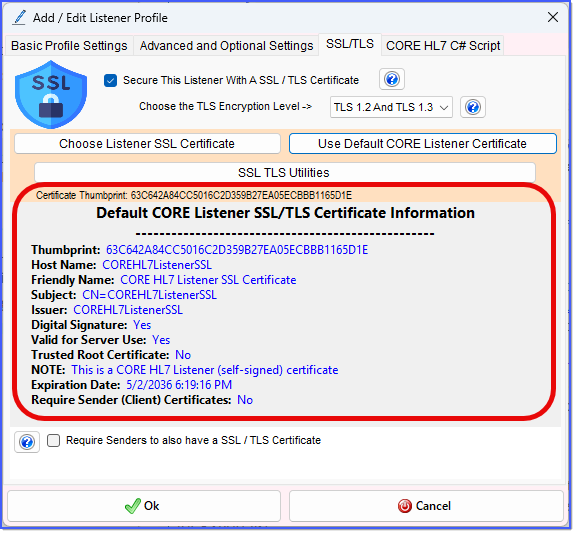
SSL / TLS Settings (Certificate Selected)
If you don't want to use the Default CORE HL7 Listener certificate and don't have a certificate you can opt to purchase a certificate from a globally trusted CA (Certificate Authority) see 3rd Party SSL Vendors for a short list.
If you don't want to use the Default CORE HL7 Listener certificate and don't want to buy a certificate from any 3rd Party SSL Vendors you can also create your own Self-Signed SSL Certificate.
If your HL7 Sender Trading Partner(s) need you to send them information about your Listener certificate see SSL Utilities.
Bidirectional SSL / TLS Encryption
You can also require Mutual TLS (or Bidirectional SSL). This is where you (as the Listener) also require that any HL7 Sender Trading Partner that wants to send HL7 to you also have their own SSL / TLS certificate. See Two Way SS:L/TLS.
