Coming in Version 3.5.
You may find that your HL7 Sender Trading Partner(s) need you to send them information about the SSL Certificate your HL7 Listener is using for them to configure their system. For that you want to open the SSL Utilities window by clicking the SSL TLS Utilities button.
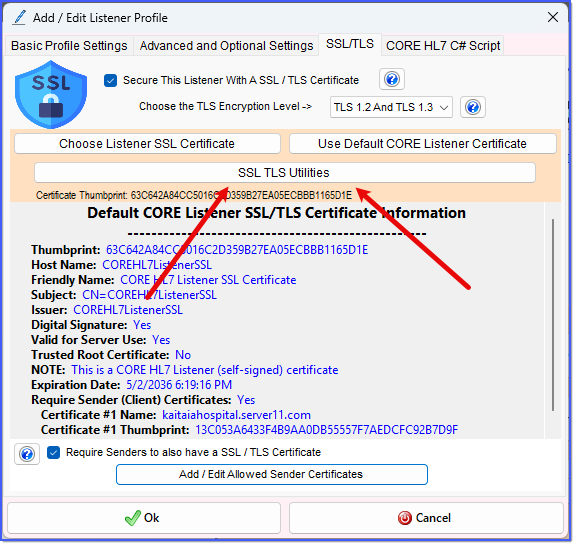
Open The SSL Utilities Window
In the SSL Utilities Window you will see some information about the SSL/TLS certificate you have chosen to use in your Listener Profile.
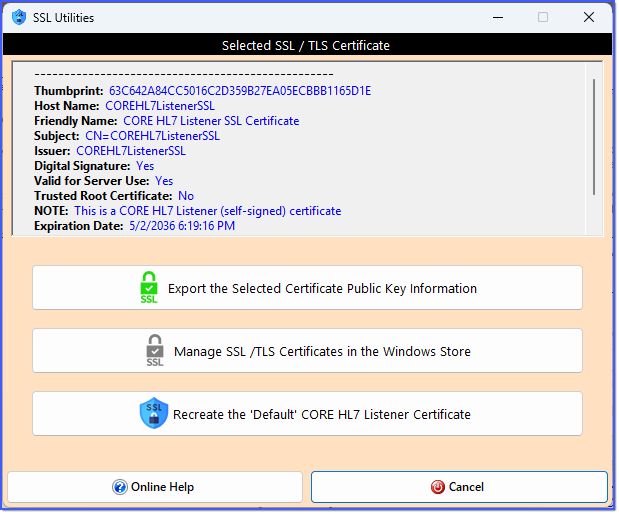
SSL Utilities Window
In this window there are 3 main buttons. Let's go over the 2 buttons that you are LEAST likely to ever use:
 Manage SSL/TLS Certificates in the Windows Store. Opens the Windows certificate store. Admin access is sometimes required so you may not have permissions to do this. This button is identical to selecting the same option from the SSL Utilities sub menu of the Tools menu in the main window.
 Recreate the 'Default' CORE HL7 Listener Certificate. You should not ever have to do this unless 10 years has expired since you installed the SSL Enabled CORE HL7 Listener. If you do this it may cause problems with any of your HL7 Listener Profiles which currently are using the Default Certificate in that you may need to send all of those profile Trading Partner(s) the new certificate information. See the FAQ for more information.
The most common reason to use this window is to:
 Export the Selected Certificate Public Key Information. Most times you will need to do this IF your HL7 Sender Trading Partner(s) need information about your Listener certificate to configure their own software to connect to yours. Just click this button and you'll be prompted to save the certificate public key file (.cer). When you select the folder and file name you want and click Ok the software will attempt to create THREE (3) different files. All with the same name and different file extensions. They are:
.CER File. This will contain the certificate public key in certificate form.
.PEM File. This is also a certificate public key file in BASE64 format.
.TXT File. This is a human readable text file with some information about the certificate like the Thumbprint, HostName, Expiration Date, etc.
All of the files created are "safe" to email to anyone and contain no proprietary information.
