 NEW in version 3.0
Effective with version 3.0 you can now create a PRIVATE windows service instance which will be dedicated to running ONLY ONE Schema Profile (see Creating a Private Service below).
Question: Why would I use this?
Answer: That is entirely up to you. The CORE SQL Engine software is fully multi-threaded which means that theoretically you can assign every Schema Profile to just one of the Primary Services (1-20) and they will all run just fine. If you have 20 or fewer Schema Profiles you really don't need the Private service because you just assign each Schema Profile to run in a different Primary service and they are all running in a dedicated windows service. See the example use case scenarios below for examples.
Private Service Use Cases
The way our services work. If you create a NEW Schema Profile and assign it to a primary service which is already installed and running other Schema Profiles you MUST restart that service instance so that it "picks up" the NEW Schema and starts running it. The same thing goes if you EDIT a Schema Profile which is installed in a primary service. This WILL create a small disruption in your Schema processing because every time you STOP a service, any Schema Profiles assigned to that service stop working. If they have a TCP/IP Listener enabled in the Profile it stops listening, etc. If you have many Schema Profiles (IE dozens or hundreds), and we do have customers who have this environment, then you may not have the option of STOPPING a service any time you like. This is where having the option of a Private service can come in very handy.
SCENARIO 1: Testing New Interfaces
Even if you only have a few Schema Profiles you may want to use the Private service for testing new interfaces. Example: You have 5 Schema Profiles all running in Service Instance #1. Now you need to create a 6th, so instead of assigning it immediately to a primary service instance, you assign it to a Private service. This way you can run it independently of the others, stopping and starting it as needed until you have verified that everything works correctly. Only then do you just "Promote" that Schema Profile into a primary service instance by Stopping and Removing the private service, then change the Service Instance in the Profile (see Editing a Profile), and Start/Restart the primary service instance at your leisure.
SCENARIO 2: Troubleshooting Problems
If you have a Schema Profile running in a primary service (instance 1-20) and you are having issues which need troubleshooting. Since you may need to stop and start the troubling profile several times, simply REASSIGN that profile to a Private Service (see Editing a Profile),then RESTART the primary service instance (so that it will STOP processing the troubling profile). This way you can run it independently of the others, stopping and starting it as needed until you have verified that everything works correctly. Only then do you just "Promote" that Schema Profile back into a primary service instance by Stopping and Removing the private service, then change the Service Instance in the Profile (see Editing a Profile), and Start/Restart the primary service instance at your leisure.
SCENARIO 3: High Value or High Volume Interfaces
No matter your business, no matter how many Schema Profiles you have set up, there will always be at least ONE that means more to you than the others. An example that comes to mind for us in working with customers might be a Schema that imports HL7 messages directly from vital monitors (surgical monitors, bedside monitors, etc) which the customer uses to feed near real-time data into their system. This is probably a Schema Profile that you DON'T want running in the same instance as the one that imports HL7 messages for the data warehouse, or tomorrow's patient lunch and dinner orders, etc. You don't want THIS high value Schema to ever be stopped because someone wants to change the Lunch Orders interface.
IMPORTANT CONSIDERATIONS: Performance in the User Interface
You do NOT want to create too many services. How many is too many? That depends on your computer performance. You will notice the delay when the program has to REFRESH the Windows Services to see which are running, stopped, installed, not installed, need to be removed, etc. The more services you have, the longer this will take. You can create as many Private Services as you like, but we don't recommend creating more than 20 or so.
When creating or editing a Schema Profile you select which Service Instance should run the Schema. To use a Private Service just select Private Service in the dropdown in the footer of the create/edit a profile window.

Form Footer of the Schema Profile Window
Once you have saved your Schema Profile go and have a look at the Windows Services and you will see the result.
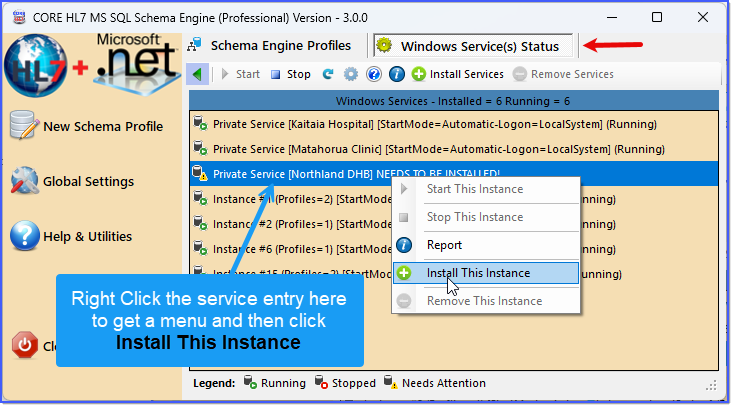
Private Service Needs Installing
Now you are ready to start the Private service.
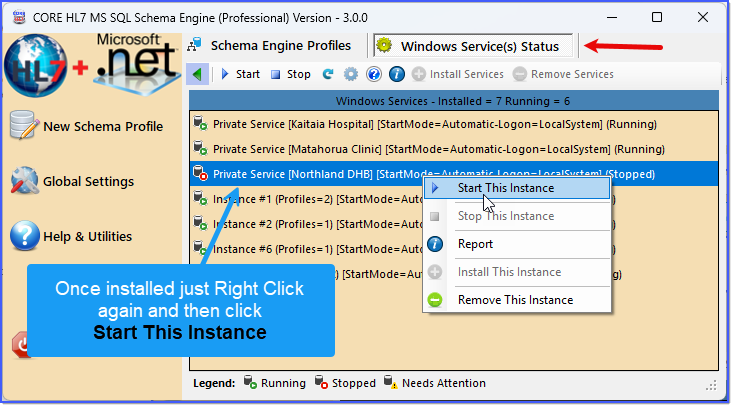
Private Service Needs Starting
And you are done! Your Private Service is created, installed, and running!
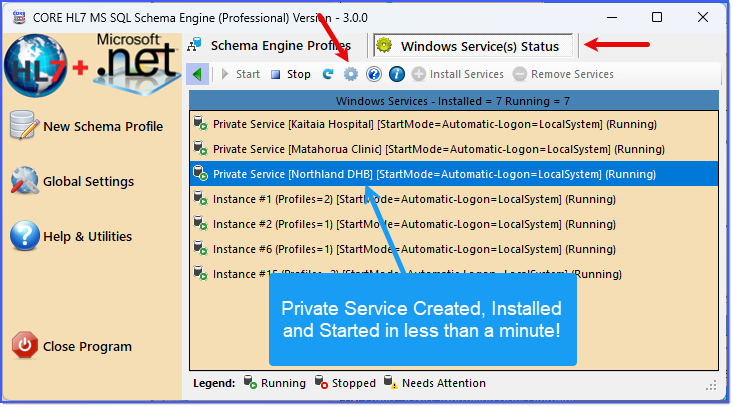
Private Service Is Running
To see what this looks like in your MS Windows Services list just click the Open Services ( ) button on the toolbar to open the MS Windows Services snap-in and scroll down in that list to the CORE HL7 services.
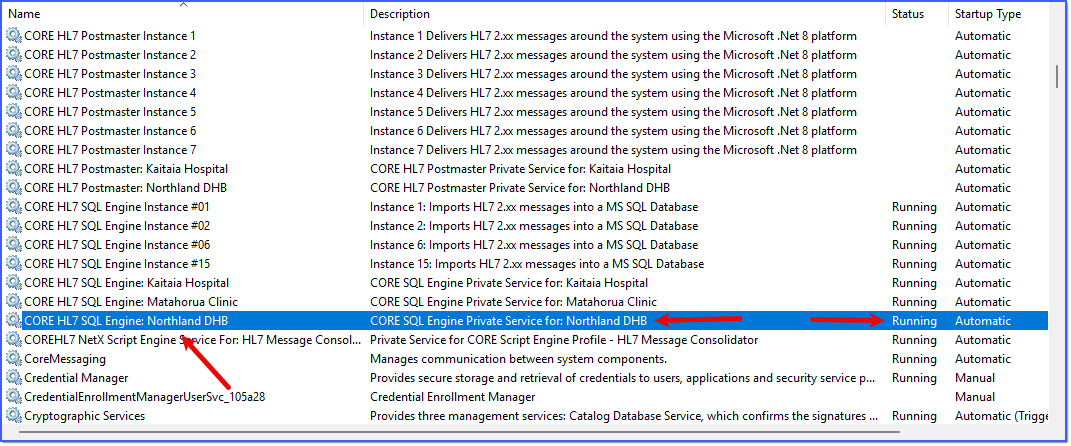
Private Service Is Running
