If you are using the UltraPort SQL Schema Engine for Microsoft SQL Server you will need to make a very minor change to your schema tables to allow the CORE HL7 Viewer to connect so that you can view messages from your database in the CORE HL7 Viewer. NOTE: This is only for Microsoft SQL Server, UltraPort MySQL schemas are still not supported.
Here you just create (or edit) your database connector as normal.
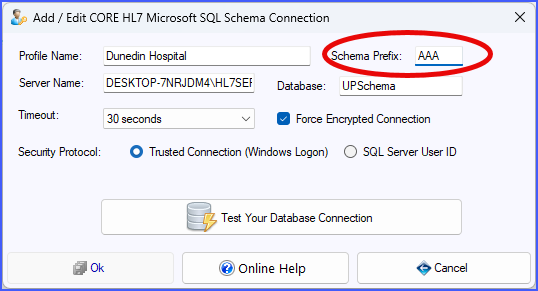
Example Database Connector (Prefix AAA)
Now, BEFORE you click OK or Test Your Database Connection run the 2 SQL statements below to add a new column (which will never be used) to your primary <prefix>_HL7Data table.
/*
If your Schema Prefix is AAA run these 2 SQL Statements in Microsoft SQL Management Studio
#1
*/
ALTER TABLE AAA_HL7Data
ADD CoreHL7API INT NULL CONSTRAINT DF_AAA_HL7Data_CoreHL7API DEFAULT (0);
GO
/*
#2
*/
Update AAA_HL7Data Set CoreHL7API = 0;
GO
If your Schema Prefix is anything else then just replace the AAA with whatever your Schema Prefix actually is. Example:
/*
If your Schema Prefix is HL7 run these 2 SQL Statements in Microsoft SQL Management Studio
#1
*/
ALTER TABLE HL7_HL7Data
ADD CoreHL7API INT NULL CONSTRAINT DF_HL7_HL7Data_CoreHL7API DEFAULT (0);
GO
/*
#2
*/
Update HL7_HL7Data Set CoreHL7API = 0;
GO
