You can now configure your CORE HL7 Sender to connect and send HL7 to a HL7 TCP/IP Listener which has implemented a TLS Certificate (formerly called SSL) for identification and encryption of HL7 data as it is being transported over TCP/IP to the Listener. The decision as whether or not to use SSL / TLS connections is one that is ONLY made by the HL7 Listener. The HL7 Sender cannot establish a secure connection to a HL7 Listener which has NOT implemented a SSL / TLS encryption certificate. To understand further it would help to review What Is A TCP/IP Listener below which will show the difference between a TCP/IP Listener, a HL7 Standard TCP/IP Listener, and a Secure Encrypted TCP/IP Listener.
A TCP/IP Listener is a software component or service that waits for incoming network connections on a specific TCP/IP port. When another system connects and sends data, the listener receives and processes that information according to the application’s protocol rules. TCP/IP Listeners are used throughout the technology industry for many different purposes and there is a world-wide TCP/IP Standard for how they work. Common examples of software that use TCP/IP Listeners include Microsoft SQL Server listening for database connections, Microsoft IIS listening for web traffic, OpenSSH listening for SSH remote login sessions, email servers listening for SMTP email traffic, etc. Any server application that accepts inbound network communication typically uses one or more TCP/IP Listeners.
IMPORTANT: A BASICTCP/IP Listener is not secure and not encrypted.
What is a HL7 TCP/IP Listener?
A HL7 TCP/IP Listener (like the CORE HL7 Listener) is any software that uses a TCP/IP Listener (just like MS SQL Server or IIS) that is "listening" for HL7 messages to arrive on the specific port number it is listening on.
IMPORTANT: There is a world-wide HL7 Standard for HL7 TCP/IP Listener software that dictates that the TCP/IP Listener used must be a BASICTCP/IP Listener. (ie NOT encrypted).
What is a Secure Encrypted TCP/IP Listener?
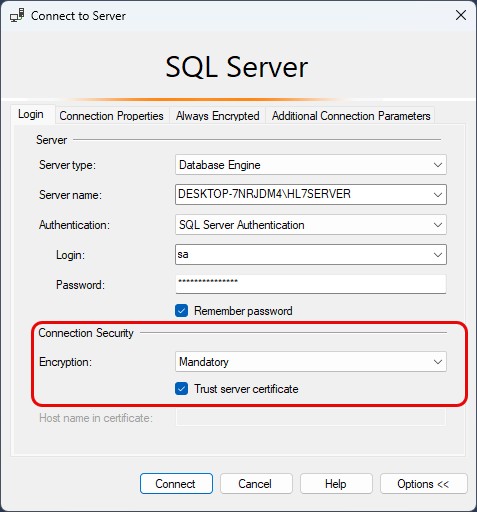
A Secure Encrypted TCP/IP Listener is a specialized TCP/IP Listener that uses SSL/TLS encryption technology to establish a secure encrypted network connection before any data is exchanged, unlike a BASICTCP/IP Listener, which receives plain unencrypted data. There is also a worldwide TCP/IP Standard for working with a secure encrypted listener. For example web servers will support HTTP:// (unsecure) or HTTPS:// (secure). If you have ever used Microsoft SQL Server you will be familiar with the open connection screen in SQL Management Studio (see below).
MS SQL Server Connect Screen
For MS SQL Server (which is a TCP/IP Listener) you can enable encryption as well.
Why this is Important?
This is important because it means that any Secure Encrypted TCP/IP Listener is, by definition, NOT a HL7 Standard TCP/IP Listener. What we have done with the CORE HL7 TCP/IP Listener is adhered to the worldwide TCP/IP Standard when creating our secure encrypted HL7 TCP/IP Listener. This means that to send HL7 messages to a secure encrypted HL7 Listener, it must adhere to the worldwide TCP/IP Standard for connecting to and sending secure, encrypted data over TCP/IP.
Starting with version 3.5 of the CORE HL7 Listener you can now attach a X.509 certificate to your listeners to make the connections encrypted from end to end. While this secure encrypted listener is not "HL7 Standard" it does follow the TCP/IP Standard for creating a SSL/TLS enabled TCP/IP Listener. See the CORE HL7 Listener Online Help.
There is certainly a use case scenario where we think that this (secure HL7 Listener and Sender using SSL) is a very good idea, like when you are sending and receiving HL7 within your own LAN or WAN. In these situations where it might not be practical to set up VPN tunnels this might be reasonable.
Then why do we do it? Why do other HL7 Software Vendors do it?
Unless you are sending HL7 from a Sender to a Listener on the same computer then you really should have some form of end to end encryption. Why do you need it? Security is a common answer because people often confuse Encryption with Security. Encryption is NOT Security! Security covers a huge array of topics from firewalls, virus scanners, network monitoring software, windows user group security policies, etc. all the way down to making sure that Sally at the front desk has her monitor pointed AWAY from patients in the waiting room when looking at screens with patient data visible. Encryption, and where and how it needs to be implemented, might be a tiny fraction of Security! If your situation requires TLS Encryption of HL7 data (which it might not) you should carefully examine why this type of solution is correct for you. In our opinion the vastly superior solution is to use a VPN (Virtual Private Network) typically hosted by the machine running the HL7 Listener or by the larger organization. This allows the VPN software to handle the end-to-end encryption. VPN software comes in all shapes and sizes and all are much more in tune with how to handle the SECURITY of Network communications. Then IF the situation warrants it, consider using both options.
SSL / TLS HL7 Only
Consider the image above. Using SSL/TLS alone encrypts the HL7 traffic between the sender and receiver, which protects the message contents from being easily intercepted. However, exposing HL7 Listener ports directly over the public internet or a wide-area network (WAN) still increases security risk because the system itself becomes visible and reachable by outside networks. Attackers can continuously probe open ports, attempt denial-of-service attacks, exploit operating system vulnerabilities, or try to abuse weak certificate or authentication configurations. TLS protects the data in transit, but it does not hide or isolate the service itself. So whether this is safe or not depends on the network SECURITY. What type of network is being traversed between Site-A and Site-B? If it is the internet, this is NOT SAFE. If it is your LAN (local area network), this is probably safe. If it is a large WAN (wide area network) or intranet, this might be safe but be cautious.
Secure VPN Only
If you are using a secure VPN as shown above there is no legal or regulatory requirement anywhere in the world that says you need anything more as far as the end-to-end encryption of HL7 messages is concerned because a properly configured VPN adds another security layer by creating a private encrypted network tunnel between trusted sites. This reduces exposure because the HL7 Listener is no longer openly accessible from the internet. In practice, many healthcare organizations prefer VPNs because they provide network isolation, access control, and easier firewall management in addition to TLS encryption. VPN (Virtual Private Network) software is an entire industry (from free open-source software to top-secret ultra-secure networks used by the CIA and NSA) that is dedicated to handling and integrating with SecurityincludingEncryption. This is why we still say that this is the best way to go unless you need even more (see below).
Secure VPN AND HL7 SSL/TLS
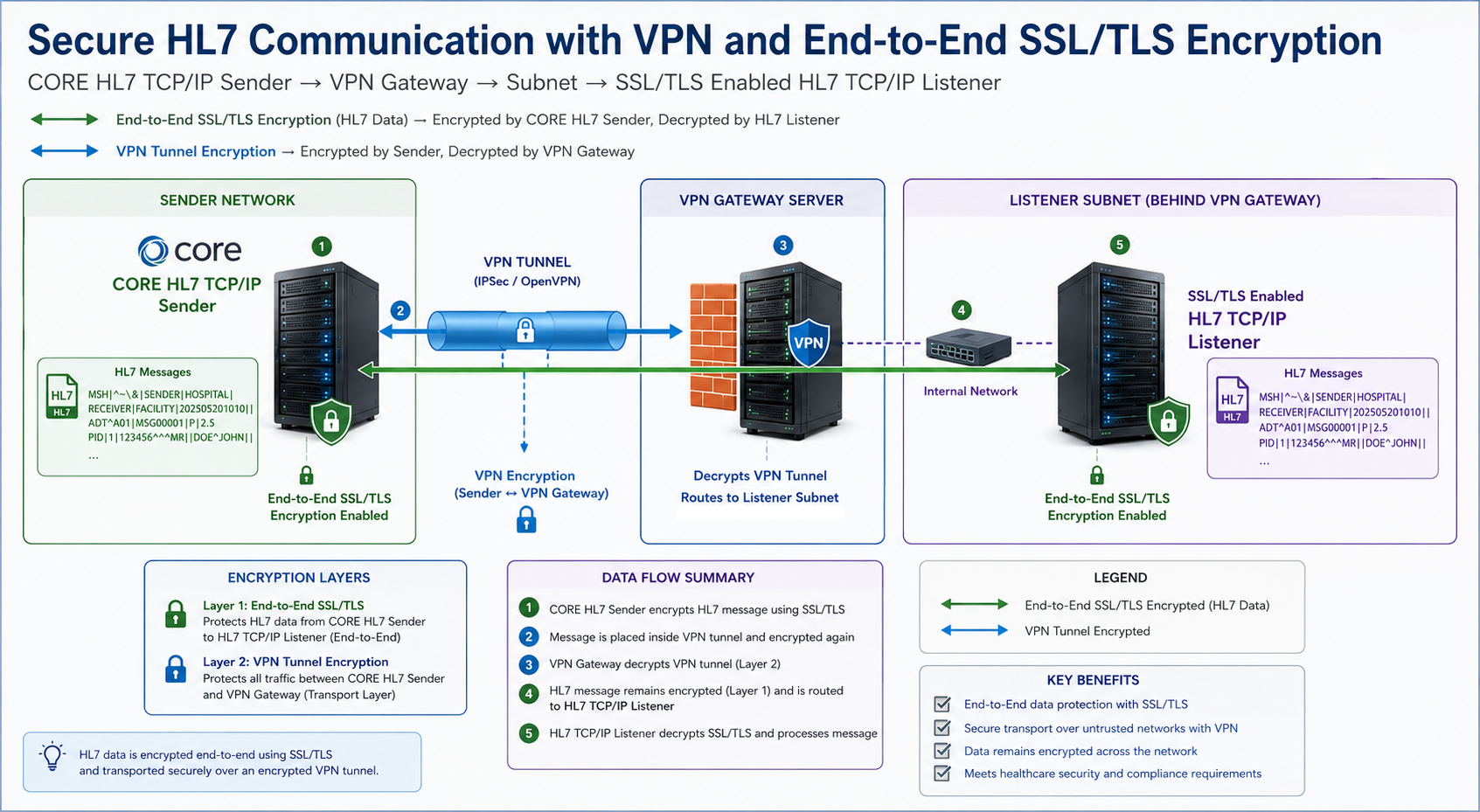
The most secure approach is often to use both together: VPN for private network connectivity and general encryption, and TLS for end-to-end message encryption and authentication. IF you opt to implement this there is a caveat, all HL7 data WILL be encrypted/decrypted at least TWICE and there is a performance consideration. As in the image above, the VPN secures and encrypts data between Site-A and Site-B .
The HL7 TLS Sender and TLS Listener encrypts HL7 data all the way from to .
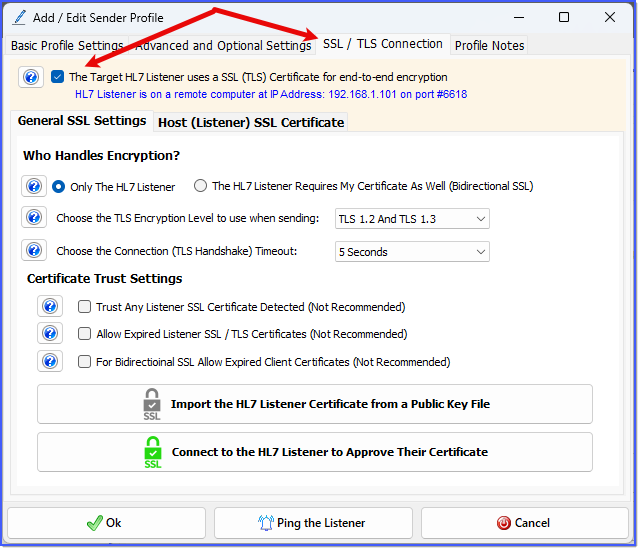
To turn your profile into a SSL/TLS secure sender you first have to check The Target HL7 Listener uses a SSL (TLS) Certificate for end-to-end encryption.
SSL / TLS Settings
Who Handles Encryption?
In this area you choose whether the SSL connection is one way or bidirectional, select which Encryption level you will use when sending and set the TLS Handshake timeout. First you have 2 choices which will determine whether you will be using 1 way SSL/TLS or bidirectional SSL/TLS. Choices are:
1. Only The HL7 Listener - For 1 Way SSL. Only the target HL7 Listener has to have a certificate.
2. The HL7 Listener Requires My Certificate As Well (Bidirectional SSL). Your profile must also have a SSL/TLS Certificate.
Choose the TLS Encryption Level: Here you will have 3 options, TLS 1.2 And TLS 1.3, TLS 1.2 Only, and TLS 1.3 Only. TLS settings control how your HL7 Sender and Listener secure their connection. Choosing TLS 1.2 and TLS 1.3 allows the system to negotiate the best available protocol—typically using TLS 1.3 for better performance and security, but falling back to TLS 1.2 if the other system doesn’t support the newer version. This is the most compatible option and is usually recommended unless you have strict requirements. Selecting TLS 1.2 Only or TLS 1.3 Only restricts communication to a single protocol version. TLS 1.3 is newer, faster, and more secure, but not all systems support it yet. TLS 1.2 is older but still widely used and reliable. If both systems don’t support the same version, the connection will fail, so these options are typically used only when required by the system you are connecting to.
Choose the Connection (TLS Handshake) Timeout: Choose the handshake timeout (5 to 10 seconds).
If you check this box your CORE HL7 Sender profile will accept any SSL/TLS certificate presented by the HL7 Listener it is connecting to. The certificate must be a valid certificate and cannot be expired (unless you have checked the next box.
Why is this Not Recommended?
Answer: Because it defeats one of the 2 primary purposes of doing SSL/TLS communications. When people think of SSL they primarily think of ENCRYPTION, and this is true encryption is important, BUT the other primary function of doing this at all is for IDENTIFICATION, and it is equally important. Your CORE HL7 Sender should connect to and accept/approve the SSL certificate your Trading Partner (the HL7 Listener) is using. If that certificate changes, your Sender Profile will FAIL to send HL7, AS IT SHOULD!
Implementing secure communications does have some trade-offs which can be much more difficult to work with than just using a standard HL7 TCP/IP connection. This is why WE always recommend that you and your Trading Partner(s) use a secure VPN rather than implementing SSL / TLS Certificates at the HL7 Sender and Listener software level.
If you check this box your CORE HL7 Sender will NOT validate whether the HL7 Listener certificate is expired or not.
Why is this Not Recommended?
Answer: Because you should NOT allow expired certificates! If your Trading Partner has an expired SSL certificate then they should replace it with a new one. Yes, this means that you have to go through the Listener certificate approval again. Yes, this means that while this is happening your HL7 messages will NOT be sent. Yes, this means that YOU have to keep track of all of your SSL enabled Profiles and watch for Listener certificates that are expiring soon and contact your Trading Partners and coordinate when they will be implementing their new certificate. Yes, this is incredibly inconvenient!
However, this is what implementing proper SSL communications means.
If you check this box AND you are doing bidirectional SSL your CORE HL7 Sender will NOT validate whether the certificate you are using is expired or not.
Why is this Not Recommended?
Answer: Because you should NOT allow expired certificates! When your certificate expires then you should replace it with a new one. Yes, this means that you probably will have to coordinate this with your HL7 Listener Trading Partner and give them your new certificate public key. Yes, this means that while this is happening your HL7 messages will NOT be sent. Yes, this means that YOU have to keep track of all of your SSL enabled Profiles and watch for Client certificates that are expiring soon. Yes, this is incredibly inconvenient!
However, this is what implementing proper SSL communications means.
IF you have NOT checked the Trust Any Listener Certificate Detected box you will have to actually get the certificate information from your HL7 Listener Trading Partner. This is done one of 2 ways:
1: Click the Import the HL7 Certificate From A Public Key File button. In order for this to work your HL7 Listener Trading Partner has to provide you with their certificate Public Key in either a .cer or .pem file.
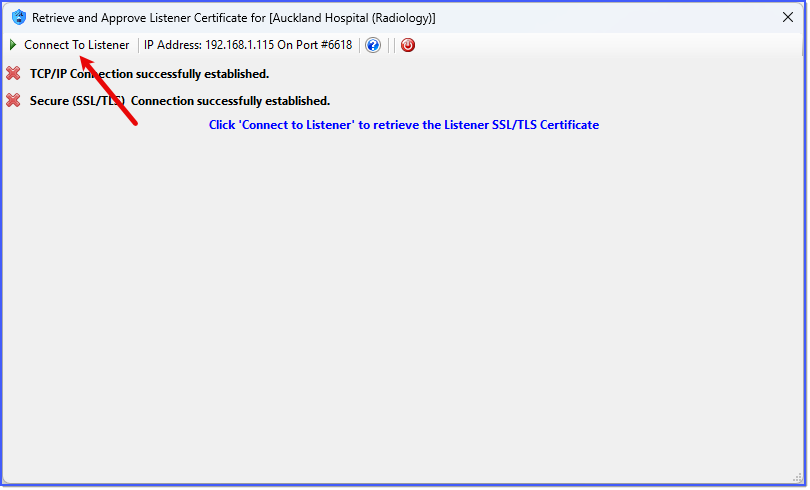
2: Click the Connect to the HL7 Listener to Approve Their Certificate button. In order for this to work your HL7 Listener Trading Partner must be listening. Clicking this button will open the Retrieve and Approve window.
Connect and Retrieve Listener Certificate
Click the Connect To Listener button on the toolbar.
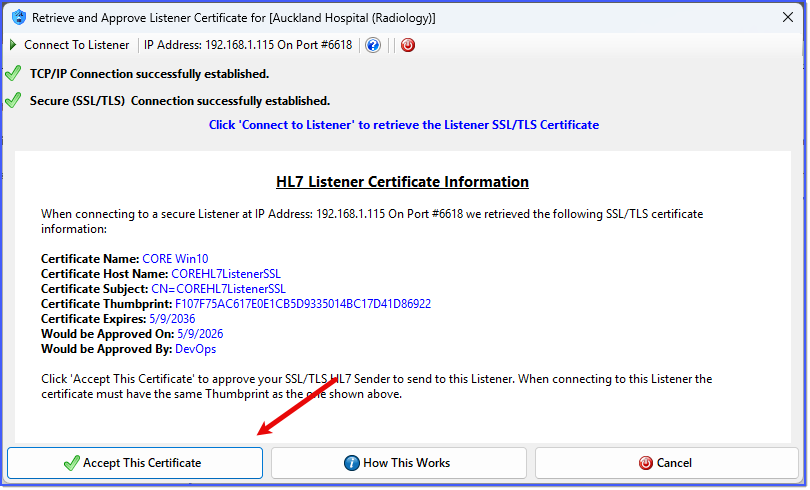
Approve Listener Certificate
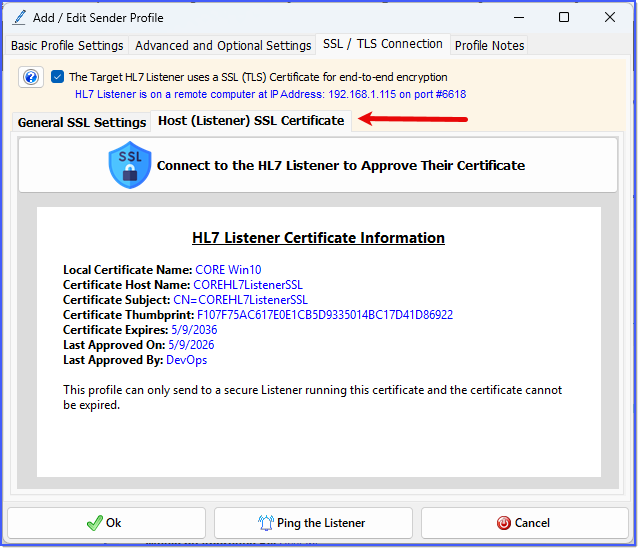
If a secure connection is successfully established then you will see a report in the window AND the Accept This Certificate button will appear. Click this button and you will be prompted to give the certificate a name for your local storage. When you return to the Add/Edit Sender Profile window you will see this certificate information report in the Host (Listener) SSL Certificate tab.
Approved Listener Certificate
Now that you have approved the Listener certificate your CORE HL7 Sender profile can ONLY connect to a secure HL7 Listener which has this exact certificate which is identified by the Certificate Thumbprint. If the HL7 Listener changes their certificate without notifying or coordinating with you, your CORE HL7 Sender will fail to connect and send HL7 messages, as it should.





 and
and  to
to  .
.
 Import the HL7 Certificate From A Public Key File button. In order for this to work your HL7 Listener Trading Partner has to provide you with their certificate Public Key in either a .cer or .pem file.
 Connect to the HL7 Listener to Approve Their Certificate button. In order for this to work your HL7 Listener Trading Partner must be listening. Clicking this button will open the Retrieve and Approve window.