As you advance you may need to upgrade your CORE HL7 software to the latest version. Detailed instructions are in the video below.

Upgrade Your Software
If you are upgrading from an earlier version of the CORE HL7 Sender (older than version 3) you will need to be aware of some changes we have made to our MS Windows Services. What this means is that if you currently have any of the older CORE HL7 Windows Primary Services (instance 1 - 4) installed they will need to be stopped and removed when you start the new version. This process is largely automatic (should only take about 5 seconds) but is absolutely required. If you do have these Legacy services installed you will see this message appear when you start the program. Just click YES here and let the software remove the old services, then reinstall the new service(s).
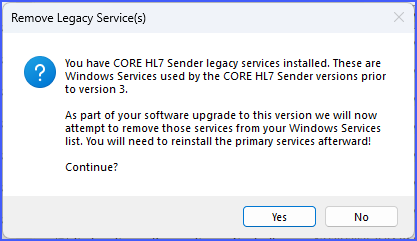
Remove Legacy Services
